
Search Products & Tools

MSG Converter Software Interface
v1.0Free Trial
30-Day Money Back
24/7 Support
Virus Free

Download MSG to MBOX Converter

Export MSG files to MBOX with attachments

Total Ratings: 720 - Average Rating: 4.8 out of 5
Export heavy MSG files to MBOX format
MS Outlook presence is not necessary for conversion
Smart and reliable way for migration
Allows to export desired MSG files
Convert attachments along with Mail
Easy to use and convert MSG emails to MBOX
Windows compatible utility
Suitable for home and corporate users
Easy way to import MSG to Thunderbird, Apple Mail, Eudora, Postbox, etc.
Preserve folder structure, does not make any changes to original database

GainTools MSG to MBOX Converter

Get perfect resolution to migrate MSG files into MBOX

Export with Outlook involvement

Outlook installation is not required to export MSG emails to MBOX format along with attachments. The application works independently without Outlook. Every size MSG file is simply exported to MBOX file format.

Selective MSG file export

The application allows users to export desired MSG files into MBOX file format. One can export as many MSG files as they want into MBOX file format in a single round of conversion without facing any difficulties.

Accurate conversion

The utility performs error-free conversion of MSG files into MBOX file format. No harm to any file during and after the migration. All the meta properties and formatting of MSG files keep maintained after the migration.

Benefits of MSG to Thunderbird MSG Converter


no file size limit

Entire conversion facility

The program offers complete conversion of Outlook MSG messages, attachments, and email attributes like to, cc, bcc, subject, date, time, and other details. The utility performs complete conversion of MSG files without modifying the original files. Irrespective of MSG file size and number, the conversion can be completed easily.

no file size limit

Save email formatting & folder hierarchy

Email formatting and folder hierarchy are two important components which should be taken care while performing the migration. The utility maintains all details like hyperlinks, font styles, inline images, etc. throughout the conversion. Moreover, the utility does not alter the hierarchy of folder series after the conversion.

no file size limit

Descriptive & Independent Tool

The utility offers a descriptive interface due to which without taking prior training one can handle the conversion process. There is no need to install Microsoft Outlook to perform the conversion. Every edition Outlook MSG file can be simply converted to MBOX file format without any trouble.

no file size limit

Read MBOX on various platforms

The tool performs the conversion in the best possible manner. After performing the conversion, one can read MBOX files on multiple email clients like Mozilla Thunderbird, Postbox, Eudora, Entourage, Apple Mail, SpiceBird, and several others. The import task can be simply carried out in just a few seconds.

no file size limit

Two conversion options

Two options i.e. File or Folder mode are offered by the utility to export MSG data to MBOX file format. With the folder mode, multiple MSG files can be simply exported to MBOX file format in a single round of conversion. This will help users in saving a lot of time & efforts. The entire conversion gets completed without any losses.

no file size limit

Free Outlook MSG to Thunderbird MBOX Tool

Download the trial edition of this application and ensure its working capability before you take the license edition. The free edition is same as the licensed edition. It provides the facility to export only 10 MSG files to MBOX file format. Apply for the licensed edition and get it instantly on your email within a few minutes.

no file size limit

Windows compatibility

Run MSG to Thunderbird MSG Converter on various Windows platforms. It can effectively perform the conversion on Windows 10, 8.1, 8, 7, Vista, XP, and others without disturbing the already running tasks of the system. In a couple of seconds, one can perform the conversion and save the exported MBOX file to the location chosen by users.

no file size limit

Preview & desired file conversion

One can get complete display of MSG files before finalizing the conversion. Here, users can check all the details and select desired files for migration. There is no limit imposed on the number of MSG files to migrate into MBOX format. With the license edition, users can export limitless Outlook MSG files into MBOX file format.

How to migrate Outlook MSG data to MBOX on Windows?

To perform the conversion, follow the simple steps discussed below.

+

The first step is to install and start the application on your Windows system.
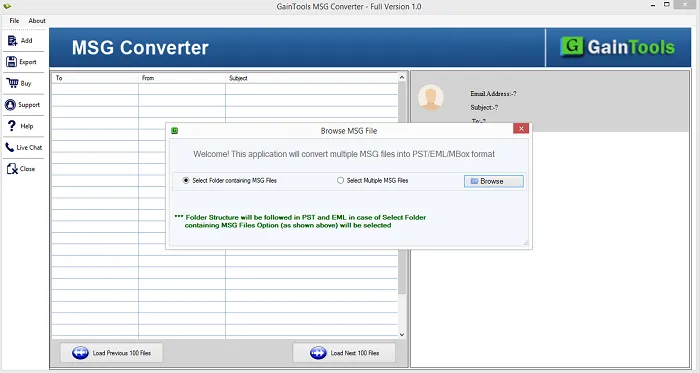
download MSG to MBOX Converter
+

Go to the Browse button and add MSG files.
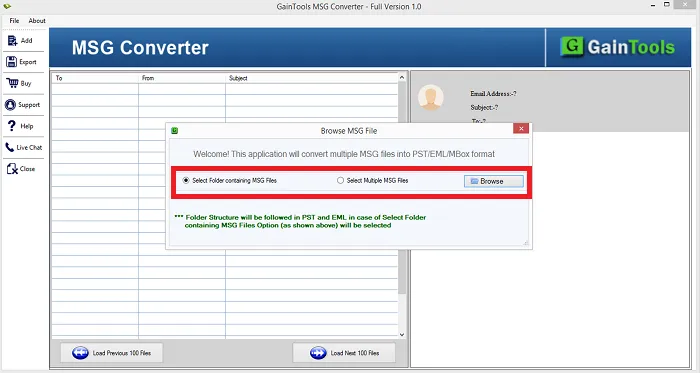
gaintools MSG to MBOX Converter
+

Get a complete display of MSG files to check the files before the migration.
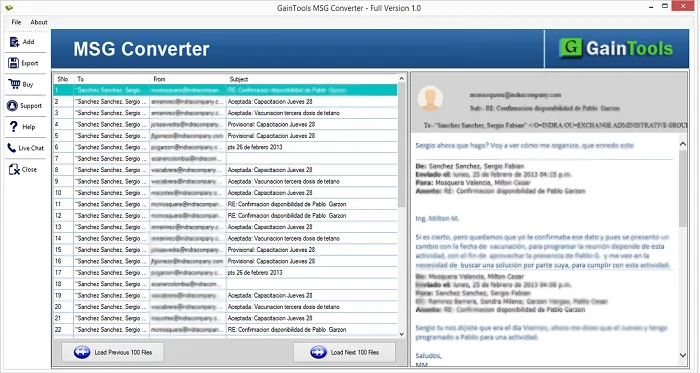
open msg
+

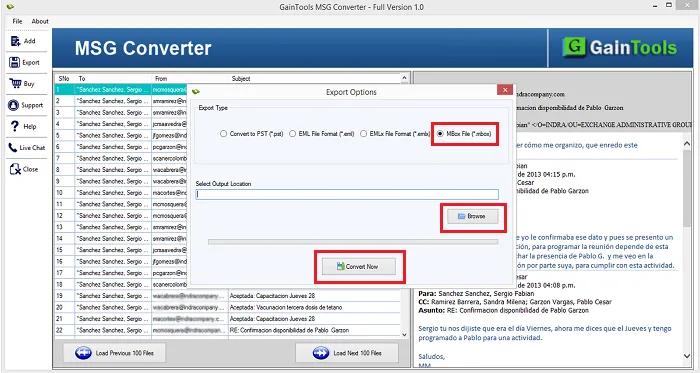
Choose MBOX file format in Export options.
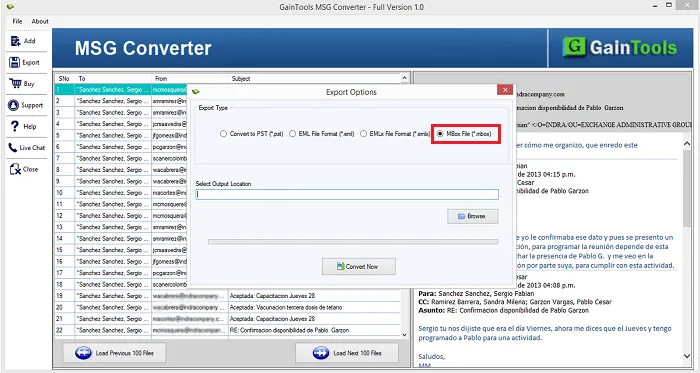
select mbox file
+

Provide an output destination to save the exported MBOX files.
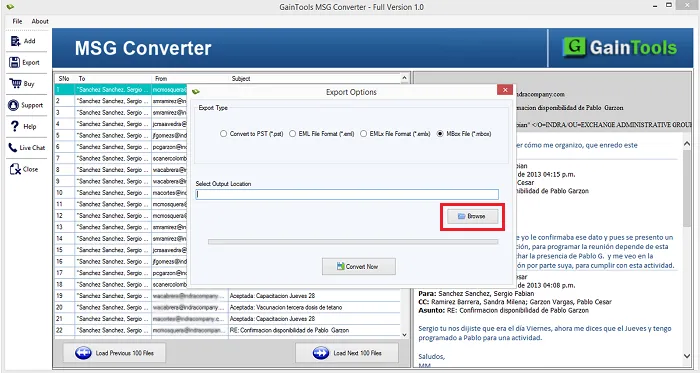
selection of output format
+

Click on the Convert Now button to begin the conversion task.
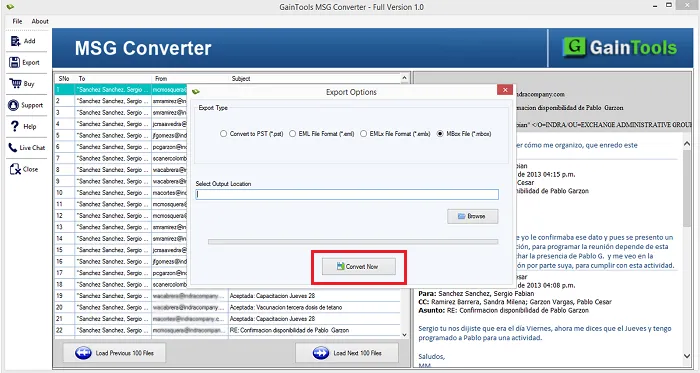
click convert now

FAQs of MSG to MBOX Conversion Tool

+

Yes, all Outlook version MSG files are well supported to MBOX format by the application.

+

No, only healthy MSG files are considered by the application.

+

The free edition offers to export only 10 MSG files to MBOX format. This will help you to analyze the performance of this utility.

MSG to MBOX Converter Process Images

Step-by-step visual guide to convert your MSG to MBOX files

How to Use MSG to MBOX Converter Tool Software

Watch our comprehensive tutorial to learn how to convert MSG to MBOX files in just a few simple steps

MSG Converter Tutorial Video

Watch Tutorial

Learn how to convert MSG to MBOX files step by step

Video Tutorial

Step-by-Step Guide

Complete walkthrough of the MSG to MBOX process

Easy to Follow

Simple instructions for all skill levels

Quick Results

See how fast the MSG to MBOX process is

MSG to MBOX Converter Tool Free Download

Software Name
GainTools MSG to MBOX Converter Software
Version
1.0
File Size
4.19 MB
Operating System
Windows 11/10/8.1/8/7 (64-bit & 32-bit)
Download a Trial

Take the tool to evaluate by converting 10 emails from each MSG to MBOX folder.

Compatibility & Format

Input Formats
MSG to MBOX
Output Formats
PST, MBOX, EMLX, MSG
License
TRIAL + FULL
Language
English

System Requirements

Processor
1 GHz or faster
RAM
Minimum 512 MB
Hard Disk
100 MB free space
Display
1024x768 resolution

Client’s views about MSG to MBOX Converter

See what our satisfied customers have to say about their experience with our MSG to MBOX conversion tool

"Easiest conversion of Outlook MSG messages to Apple Mail MBOX is performed by the tool for me. I have no doubt to say that this is the best tool for converting MSG data to MBOX format."

FM

Fidel Martin

"Instant conversion without size limits is one of the best things which I liked about this software. I got quality conversion results without damage to the any file."

JR

Joseph Rossignol

"It is a brilliant utility having easy to use interface. I checked all the features of this application in demo edition and found them same when I got the license edition."

IS

Ichae Semos