
Search Products & Tools

Cloud Migration Software Interface
v1.0Free Trial
30-Day Money Back
24/7 Support
Virus Free

Gmail to Hotmail Migration Tool

Export emails of Gmail cloud to Hotmail cloud

Total Ratings: 600 - Average Rating: 4.8 out of 5
Transfer Gmail emails to Hotmail account
Easy export of attachments as well
Preserve email formatting and email properties
Date Range filters for desired items export
No external tool required
Need Host, Port, and both cloud accounts login details
Select the targeted folder to save Gmail emails
Export entire Gmail account or selected folders
Download easily on all Windows platforms
Directly forwarding of emails from Gmail account to Hotmail

GainTools Gmail to Hotmail Exporter

Forward emails of Gmail to Hotmail account

Independent Application

A user can independently export Gmail mailboxes to Hotmail without installation on any external app. By providing login details of both Gmail and Hotmail account, one can access Gmail emails to Hotmail account.

Direct Emails Forwarding

With this software, one can redirect Gmail emails to Hotmail account. The application is completely straight-forward. You can directly export Gmail account data to Hotmail account in a few steps.

100% Safe Utility

100% data safety is there while transferring emails from Gmail account to Hotmail account. No alterations to original formatting and email properties are there with this application.

Features to Gmail Email to Hotmail Migration Tool


no file size limit

Comfortable UI

The application offers a comfortable user interface due to which no one faces any issues in handling it. Without any confusion, the migration of Gmail mailbox to Hotmail account can be easily completed. No prior technical expertise is required to operate the tool. Both professionals and beginners find the tool easy to handle without any confusion.

no file size limit

No limits set

The utility does not set any limit on the size of mailbox and the number of items. One by one, multiple Gmail accounts data is exported to Hotmail account with this tool. By providing valid login details of both cloud accounts, the data is seamlessly transferred to Hotmail from Gmail account without any loss and file misplacement.

no file size limit

Advance Filters

You may use advanced filter options and export desired items from Gmail.com to Hotmail.com account. By using this feature, users can specify a date range and export Gmail messages to Hotmail account. Moreover, users can filter items according to from, cc, bcc, etc. and export desired Gmail database to Hotmail account.

no file size limit

Access Gmail data on Hotmail

Direct access of Gmail mailboxes to Hotmail account is not possible. But using this software, one can comfortably transfer Gmail email folders to Hotmail account. The software offers instant and safe export of Gmail data to Hotmail.com account without any troubles. Unlimited emails migration from Gmail account to Hotmail is done by the tool.

no file size limit

Create new folder in Hotmail

In Hotmail account, users can create a new folder or choose an existing folder to save the emails exported from Gmail account. The tool shows the folders available in Hotmail account where you can place Gmail emails. If users want to save the emails of Gmail account separately in Hotmail, they have the option to create a new folder to save the emails.

no file size limit

Totally Windows operable utility

The software is totally Windows-based. You can perform the migration on all versions of Windows platform including Windows 10, Windows 8.1, Windows 8, 7, XP, Vista, and others. The tool does not show any compatibility issues with any Windows edition. Not a single task that is already in process is not disturbed by the tool.

no file size limit

Maintain Data Integrity

The application does not manipulate the original files throughout the migration. The complete email properties and email formatting remain intact throughout the migration. All the email components like to, cc, bcc, from, sent, date, time, hyperlinks, inline images, graphics, etc. are completely preserved when exporting Gmail messages to Hotmail account.

no file size limit

Export complete or selected folders

The application is capable enough to export complete Gmail account data to Hotmail account. Or users have the option to export selected folders like Inbox, Outbox, Sent Items, Drafts, deleted items, or any customized folder from Gmail.com to Hotmail.com account. The tool works as per user instructions, either export complete database or selected folders as per your convenience.

How to open Gmail emails in Hotmail account?

To send Gmail account data to Hotmail account, use this software and go through the steps discussed here –

+

Initially, download and install Gmail Email to Hotmail Migration Tool on your Windows system.
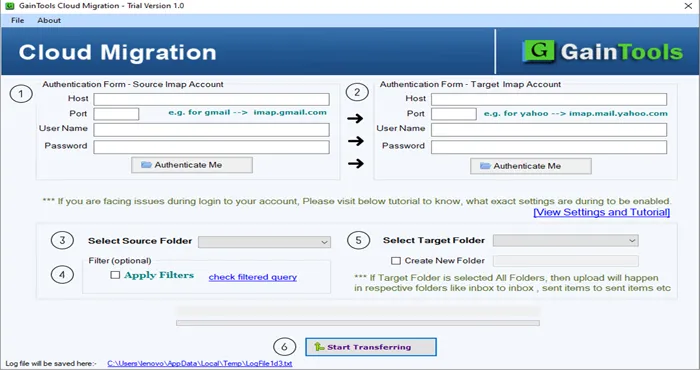
download cloud migration tool
+

Provide Host, Port and login details of Gmail account and hit Authenticate Me button.
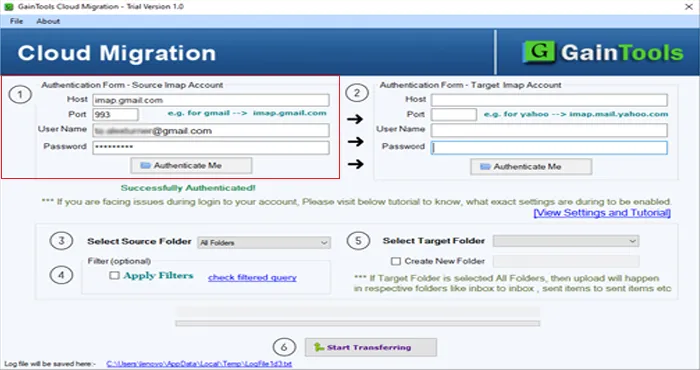
hostname cloud account
+

Provide Hotmail account host, port, username and password. Click the Authenticate Me button.
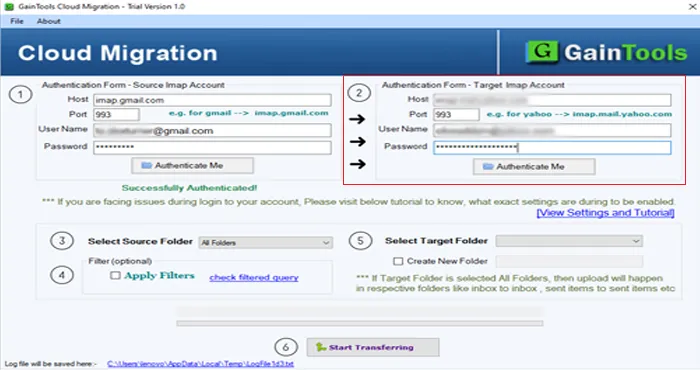
imap host login
+

Select the source folder (Gmail account) whom you would like to transfer in Hotmail. You can also click Apply filters and filter Gmail database.
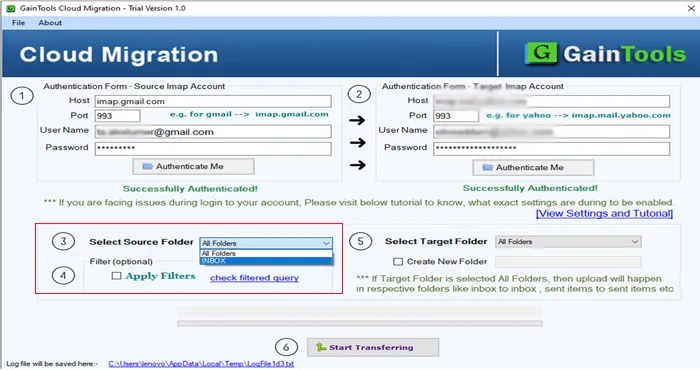
choose source folder
+

Choose an existing folder of Hotmail account or create a new folder to save Gmail emails.
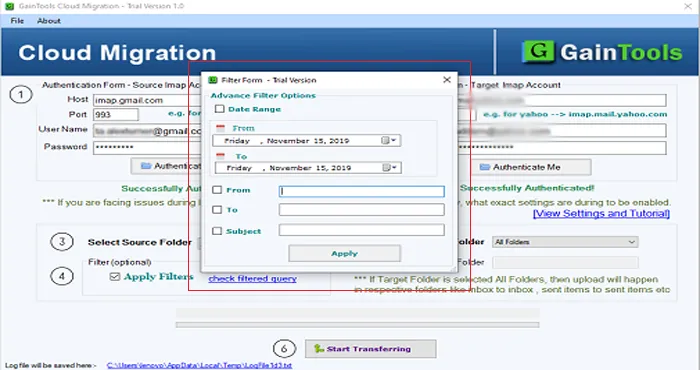
apply filter
+

Click Start Transferring button. This will commence the process of email transferring to Hotmail from Gmail account.
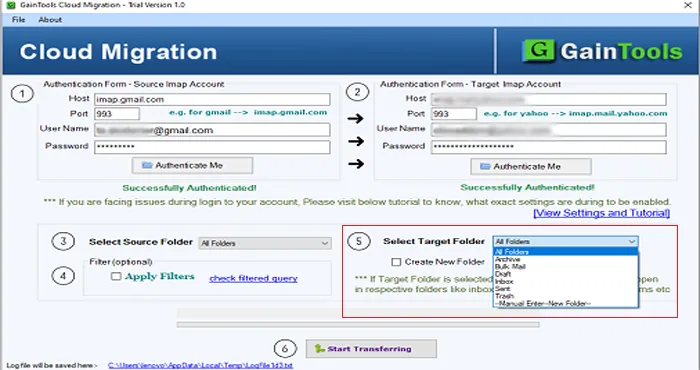

select target folder

Gmail to Hotmail Migration Tool FAQs

+

Yes, along with emails, attachments are also exported to Hotmail from Gmail account.

+

Yes, of course. With the license of this program, multiple Gmail accounts data is comfortably exported to Hotmail account.

+

Yes, the software offers complete or selected folders export from Gmail account to Hotmail account.

Gmail to Hotmail Migration Procedure Images

Step-by-step visual guide to Migrate your Gmail to Hotmail files

How to Use Gmail to Hotmail Migration Tool Software

Watch our comprehensive tutorial to learn how to migrate Gmail to Hotmail files in just a few simple steps

Cloud Migration Tutorial Video

Watch Tutorial

Learn how to migrate Gmail to Hotmail files step by step

Video Tutorial

Step-by-Step Guide

Complete walkthrough of the Gmail to Hotmail process

Easy to Follow

Simple instructions for all skill levels

Quick Results

See how fast the Gmail to Hotmail process is

Gmail to Hotmail Migration Tool Free Download

Software Name
GainTools Gmail to Hotmail migration Software
Version
1.0
File Size
4.17 MB
Operating System
Windows 11/10/8.1/8/7 (64-bit & 32-bit)
Download a Trial

Take the tool to evaluate by converting 10 emails from each Gmail to Hotmail migration folder.

Compatibility & Format

Input Formats
IMAP
Output Formats
IMAP
License
TRIAL + FULL
Language
English

System Requirements

Processor
1 GHz or faster
RAM
Minimum 512 MB
Hard Disk
100 MB free space
Display
1024x768 resolution

Client’s views about Gmail to Hotmail Exporter

See what our satisfied customers have to say about their experience with our Gmail to Hotmail migration tool

"Manual solution was too lengthy and troublesome when I read its steps. Then I came to know about GainTools Gmail Email to Hotmail Exporter Tool and it swiftly transferred Gmail data to Hotmail account in 3 simple steps."

IW

Ian Willy

"I have an awesome experience with this application. I exported my Gmail important folders to Hotmail account with this app as I was about to close my 2 Gmail accounts."

PW

Peter Warner

"Feeling good to have this program. It flawlessly exported Gmail email folders to Hotmail in a few minutes. I am impressed with the advanced filtration option. Kudos to the team."

JL

Jack Lee