
Search Products & Tools

Access Converter Software Interface
v1.0Free Trial
30-Day Money Back
24/7 Support
Virus Free

GainTools Access Converter

One-click Windows-based application to smoothly transform Access Data into Excel, JSON, SQL, and CSV formats

Total Ratings: 92 - Average Rating: 4.9 out of 5
Swiftly move Access .mdb and .accdb files to CSV, JSON, Excel, and SQL
Perform batch conversion of multiple tables all in one go
Get a preview of the uploaded data in the preview pane
Easily handles encrypted Access databases
Works well with all versions of Access, old .mdb and latest .accdb, without any issues
Convert a selective table by using the Select All or Deselect All filter option
Handles multi-lingual data with full UTF-8 encoding
Smartly filters out unnecessary system tables
Swiftly perform the task with a real-time progress indicator
Modern GUI with easy and simple-to-use steps

GainTools Access Converter

Transform your MS Access databases to JSON, Excel, SQL, and CSV file formats hassle-free

Zero Risk Data Conversion

It promises complete data security and integrity of the uploaded file throughout the conversion process. This tool only reads the data without making any changes or modifications to the original Access database while ensuring a secure and reliable conversion to other formats.

Move Multiple Tables in a Single Click

For simplified and efficient data sharing, analysis, and management it smoothly converts a batch of Access tables at once and gives you a filter option in which you can choose either all or a specific one. Through this feature you can save your time and get accurate results.

Speedy Data Conversion

This tool quickly converts Access database files (.mdb and .accdb) into numerous other formats like SQL, JSON, CSV, and Excel, and gives access for easier data analysis, sharing, and compatibility across multiple devices. It shows a real-time process and an easy-to-use tool that keeps all your original data safe.

Access Converter Tool Core Features


no file size limit

Converts Batch of Tables

If you are dealing with dozens and hundreds of tables in an Access database, instead of managing them one by one, you can choose between the Select All or Deselect All filter option and move all tables in one go without any trouble. It offers better control over the conversion process, saves time, and makes the task convenient.

no file size limit

Supports Cross-Format Export

CSV (.csv), JSON (.json), Excel (.xlsx), and SQL (.sql) all these formats are supported by this tool you can convert their .mdb and .accdb file formats into these formats in just one click without harming original data files and their structure. The conversion improves data sharing, compatibility with other platforms, and easier data analysis.

no file size limit

Secure Database Compatibility

This tool can simply handle password-protected Access databases without any issues. You just have to enter your credentials and it will manage the process on its own. All your crucial data will be protected throughout the process without any risk of data loss or security breach, as no third party is involved.

no file size limit

Define Your File Destination

For better access and authority over output it facilitates you to store the converted database in the location you desire on your system. You can create separate files for each table in their preferred format for an organized and systematic workflow. It declutters and manages the data and offers swift searching and spotting of files when needed.

no file size limit

Maintains Data Integrity

As all the Access databases are handled smartly by this tool, it ensures that during the process, all the structure, hierarchy, and content are intact, without any accidental deletion and corruption of files. This tool performs read only operation, while preserving all the data and its properties.

no file size limit

Offers Live Data Preview

Once the Access database is uploaded you can view each item or table inside the .mdb and .accdb file on the preview pane, and visually examine the data that has been uploaded before the files are converted. By this feature you can avoid mistakes, unnecessary conversions, and know exactly what you will get as results.

no file size limit

Beginner-Friendly GUI

This is a modern and easy-to-use tool that can be used by every user. No need for technical expertise as this tool comes with a self-explanatory UI, which reduces manual errors and saves the time of its users. Just upload your file, add a table and format, and without any complex steps it will convert your databases within a few minutes.

no file size limit

Free Trial Version

It offers two versions a demo and a licensed version. The demo version is completely free without any charges. To examine the capability of this tool you can explore the functionalities in the trial version before investing in the licensed version as all the advanced features are available in the trial one as well.

Step-By-Step Guide

Converting Access databases to modern formats becomes so simple once you go through the below steps-

+

Download, install, and open the tool on your computer.

launch access converter
+

To locate your .mdb or .accdb file on your system, click the Browse to set the Access File. After locating it, select the file and click to open it.

select access file
+

Add the correct password if your Access file is encrypted if needed or you can skip this step. The Load icon will smartly enable when the password is entered.
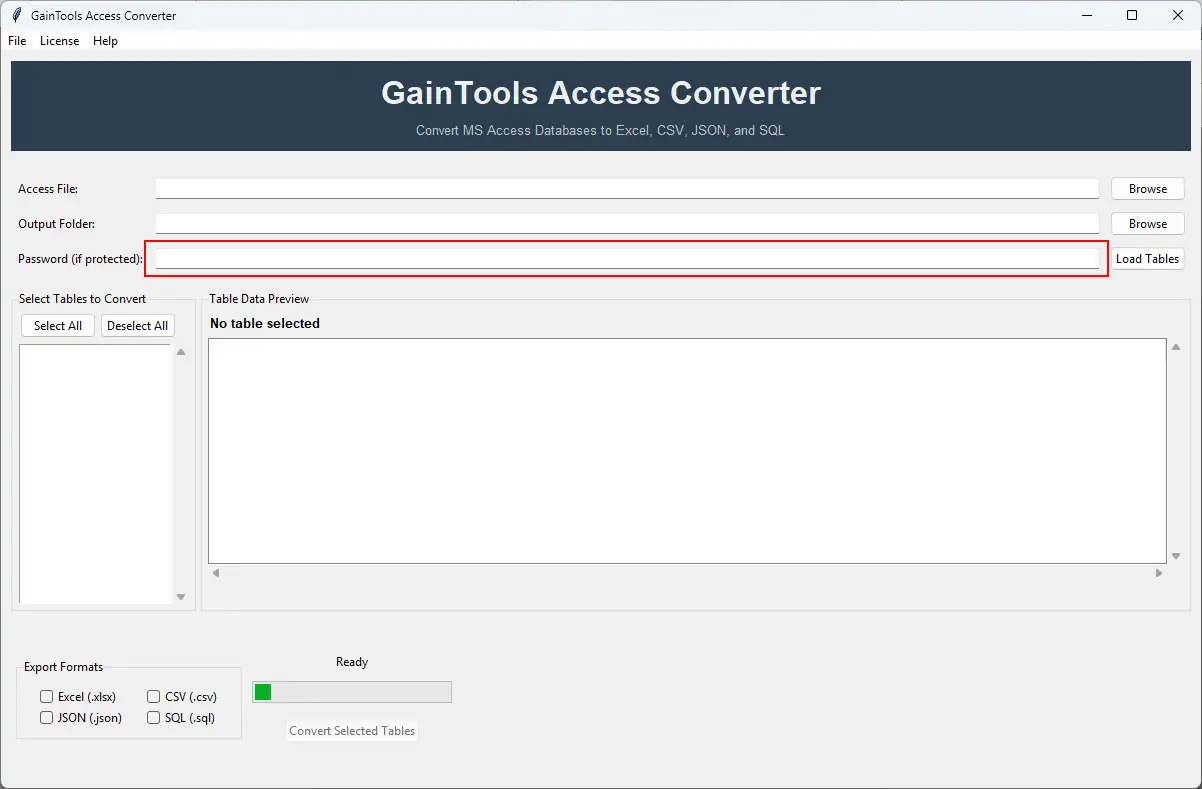
enter password
+

Tap the Browse next to the Output Folder option to set the preferred path where you want to save your output file.
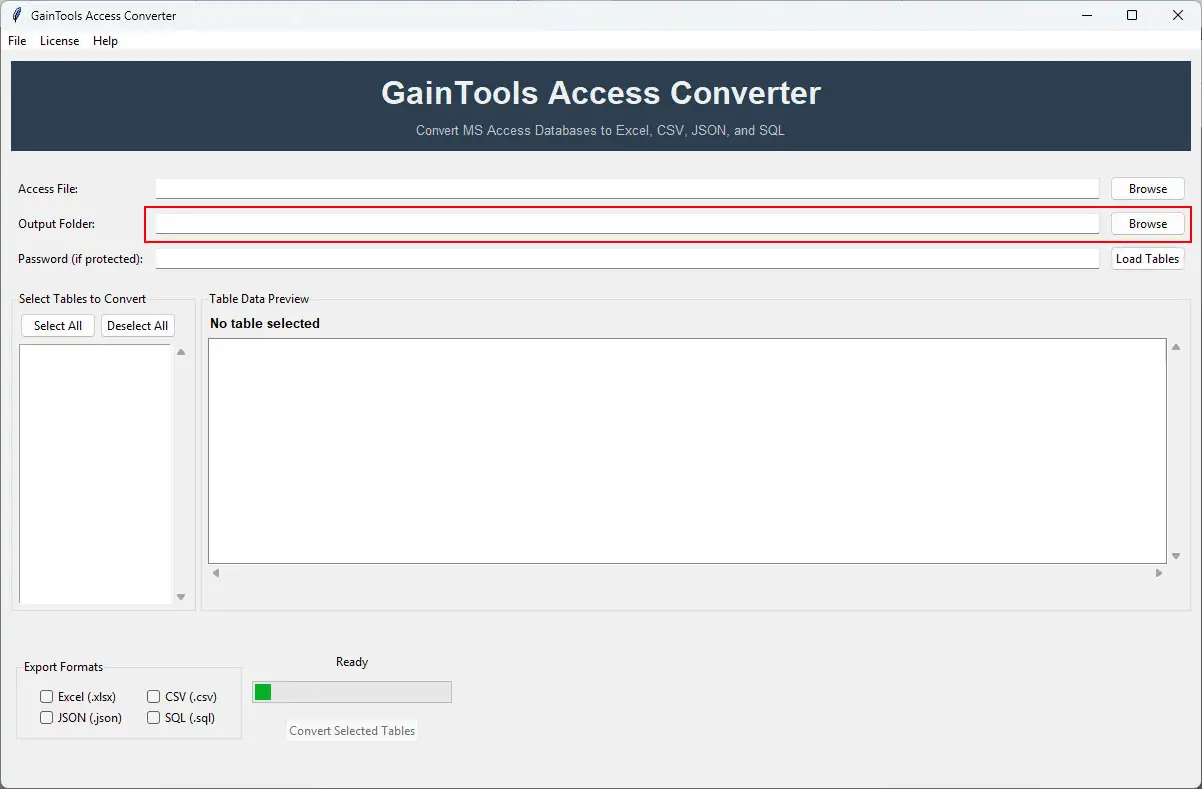
select output folder
+

To connect to your database and get a display of all available tables in the left panel, click Load Tables.

load tables
+

You can get a preview of the uploaded data by clicking on the table name and examining the data prior to the conversion.

preview data
+

Choose Table by filter option, either Select All or Deselect All, according to your preference, and then choose the Export Format that you want your resultant file as. This tool offers conversion in CSV, JSON, SQL, and Excel.

select tables and formats
+

Lastly, hit the Convert Selected Tables and monitor the real-time progress on the progress bar. You will get a notification when the conversion is completed.

convert tables

FAQs

+

This tool can handle password-protected Access databases easily without any trouble; you just need to enter the correct present password, and you're good to go.

+

All the popular formats like Excel, CSV, JSON, and SQL are supported by this tool, and you can move your Access data to them without any file corruption.

+

There is no restriction on the size and number of files you can export in one go, as this tool can effectively perform batch and bulk conversion within a few minutes without any system lag or crash.

Access Converter Process Images

Step-by-step visual guide to convert your Access databases

How to Use Access Converter Tool Software

Watch our comprehensive tutorial to learn how to convert Access databases in just a few simple steps

Access Converter Tutorial Video

Watch Tutorial

Learn how to import email files step by step

Video Tutorial

Step-by-Step Guide

Complete walkthrough of the conversion process

Easy to Follow

Simple instructions for all skill levels

Quick Results

See how fast the conversion process is

Cloud imporetr Tool Free Download

Software Name
GainTools Access Converter Software
Version
1.0
File Size
126 MB
Operating System
Windows 11/10/8.1/8/7 (64-bit & 32-bit)
Download a Trial

Take the tool to evaluate by previewing Access database tables.

Compatibility & Format

Input Formats
MBD, ACCDB
Output Formats
Excel, JSON, SQL, and CSV
License
TRIAL + FULL
Language
English

System Requirements

Processor
1 GHz or faster
RAM
Minimum 512 MB
Hard Disk
100 MB free space
Display
1024x768 resolution

Related Blogs & Resources

    There are no posts available

Client's views about Access Converter Tool

See what our satisfied customers have to say about their experience with our Access Converter tool

"I was searching for software that could convert my Access database into an Excel file format, as my task required me to work with it, so I got my hands on this software, and to my surprise, it did a great job; all my tables were converted without facing any issues. I definitely recommend this tool to everyone!"

GS

Satisfied Customer

"I personally really liked the preview option, where I can get a preview of all my uploaded tables just by clicking on the table name and checking them out, to know exactly what I'm exporting. It's helped me avoid the unnecessary file export and helped me organize my results. Loved it!"

FW

Satisfied Customer

"The trial version facility might look like a small effort, but it's a great approach, as I was a little skeptical about investing in the license version and had a talk with the customer care of GainTools, they advised me to first try the trial version, analyze the tools' functionality s and decide. It helped me a lot, the trial version worked perfectly, and later in did end up purchasing the licensed version, which I'm very happy with; it does all that it promises."

DK

Satisfied Customer