
Extract OST and PST file all items like attachments, contacts, address book, etc.
Professional solution to extract Outlook data items
Allow every size Outlook data file
Every huge size Outlook PST or OST file is considered easily by the software to extract items. There is no effect on the functioning of the software with the size of Outlook data file.
Only a few steps process
Just execute the easy steps of Outlook PST Extractor Tool and comfortably pulled out desired items from Outlook. You can save the exported items to any location of your system as per your needs.
Outlook Extractor Freeware
Outlook Attachment Extractor free demo is available so that users can examine the software before they finalize their decision to invest in it. The working of the demo version is the same as paid one but offers limited facilities.
Outlook Data Extractor Program easily extracts multiple items from Outlook OST or PST file. The items include email address, contacts, calendars, and attachments. All types of attachments (PDF, DOC, XLS, JPG, etc.) are extracted from desired Outlook email messages and are saved into a separate folder. Similarly, email addresses (to, cc, bcc, from, etc.) are exported into a Text file format.
To extract items from PST or OST file, there is no compulsion to install Microsoft Outlook. The OST Extractor program is capable enough to extract all items from OST/PST file without Outlook. You can easily load any large or over-sized Outlook PST file to extract contacts, attachments, and calendars easily. This will help users to reduce the load of PST file by keeping attachments separately out of Outlook.
Microsoft Outlook Attachment Extractor exports email attachments with proper maintenance of folder and subfolder hierarchy. During the Outlook items extraction process, the application does not harm the email components and mailbox hierarchy. It has been well examined by professionals so there is no risk of file corruption and data loss at meanwhile the data extraction from Outlook.
You don’t need to extract all folders from Outlook. You can select desired folders to extract attachments, email addresses, contacts, calendars, etc. Also, the application offers advanced filter options by which users can export the items based on date range, to, bcc, cc, from, subject, etc. Duplicate attachments can be easily removed from Outlook emails while extracting attachments.
The program permits to pull out items from Outlook and supports compatibility with both ANSI and UNICODE PST files. The software is compatible with Outlook 2019, 2016, 2013, 2010, 2007, 2003, 2002 and prior versions. Outlook Contact Extractor Tool can be utilized for personal and professional purposes. Password-protected and archive PST files are well supported by the program.
GainTools Contacts Extractor Tool extracts OST and PST contacts into vCard file format, a universal format for storing contacts. By extracting contacts from Outlook, one can easily open them on their mobile devices and multiple applications. Similarly, calendar entries of Outlook are exported into ICS format, a standard format for saving calendars. Hence, contacts and calendars are smoothly exported from Outlook with this app.
Microsoft Outlook Email Address Extractor is a windows-based utility. It is compatible with the latest as well as old versions of Windows operating systems. Run the software easily on Windows 10, Windows 8.1, Windows 8, Windows 7, Windows XP, Windows Vista, Windows Server 2019, 2016, 2012, etc. Simple to use on all Windows platforms without any interruptions.
Outlook Extractor Tool is offered in two versions. The free version is available for testing purpose for all. It can be simply downloaded from the official site. This has the same functions as paid version. However, only a few items from Outlook are extracted by the tool. After testing and having full satisfaction, users can apply for the license keys and get them within a few minutes through email to perform unlimited data extraction.
GainTools Outlook Data Extractor Tool provides a few steps to pull out items from Outlook file.
Initially, download and start the software successfully on your system.
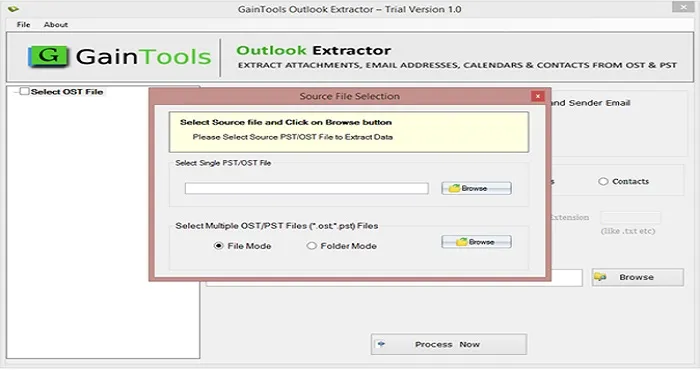
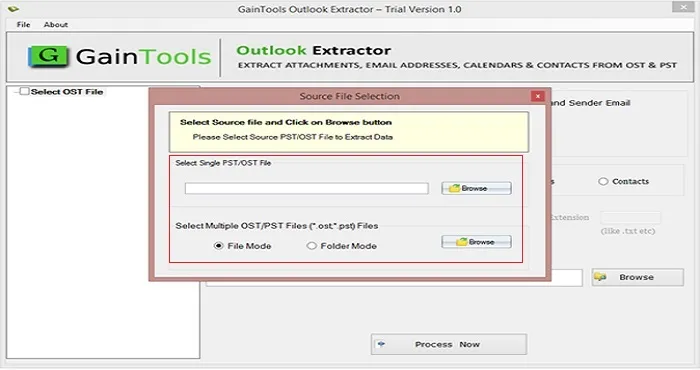
Now, use the browse button and add OST or PST file.
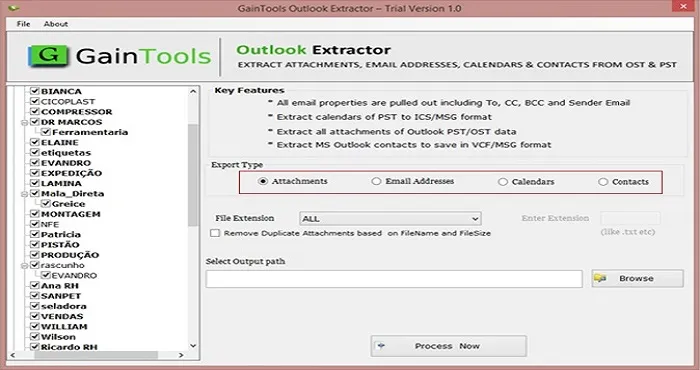
Select items to export from Outlook – attachments, email addresses, calendars, or contacts. According, select desired items to export and also use filters.
Use the Browse button and provide an output path to save the resultant files.
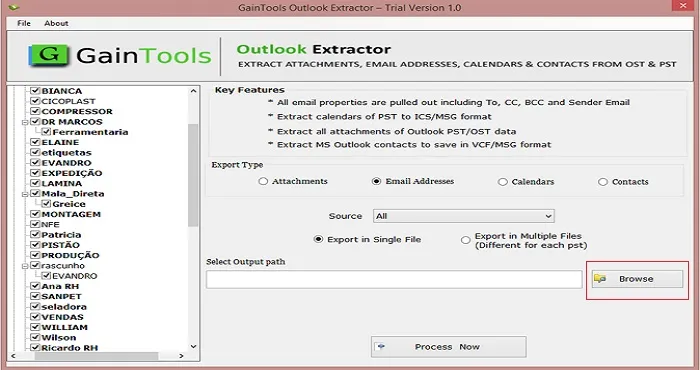
Finally, place the mouse cursor to Process Now button to begin the process of data extraction from Outlook data file.
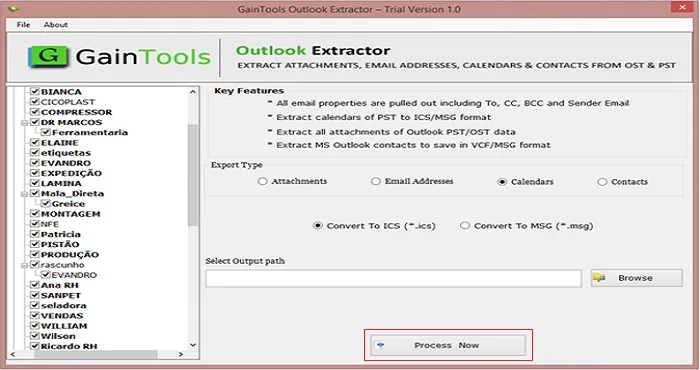
Trial Limitation - Demo Version of GainTools Outlook Extractor provides complete analyzing of the software before before in it. You can convert only 10 email messages from each folder of Outlook Extractor.
I used this application to extract attachments from OST file and comfortably extracted all attachments within a few minutes without any harm to other databases. Amazing application without lots of features.
James ArthorCanada
Extracting calendars from OST file without having MS Outlook was tough for me. But with GainTools Outlook Calendar Extractor, all the calendars are exported into ICS file format with 100% accuracy.
Collin LeeAustralia
Found it amazing to extract contacts and attachments from Outlook PST file. In terms of rating, I would give 4.9 out of 5 points to this excellent program.
Nick Thomas USA