
Search Products & Tools

MBOX Converter Software Interface
v1.0Free Trial
30-Day Money Back
24/7 Support
Virus Free

Download Cloud Migration Tool

Tool to migrate data from one cloud to another cloud email service

Total Ratings: 491 - Average Rating: 4.8 out of 5
Effective tool to migrate data from one cloud to other cloud
Fast and secure migration
Maintain quality of files and keep them original
Preserve all properties in the original form
Filtration option to migrate cloud backup to another cloud email service
Free IMAP Email Migration to understand the utility closely
Advance filter options for better migration
Require valid details of both cloud services
Backup saving folder of user-choice
No limitations to migrate from one cloud to another cloud

GainTools IMAP Migration Tool

Migrate cloud emails to another cloud with Webmail Migration Tool

Filtered data conversion

There is no need to export complete data of entire data of the webmail account. You can get filter options by which you can restrict undesired items to transfer from one cloud account to another cloud platform.

Transfer with safety

100% safe and smart transfer of cloud emails and attachments to another cloud service. Without manipulating and damaging the original files, the migration task gets completed.

Save the data as per user desire

You can simply transfer a backup of one cloud account to another cloud with this utility. One can save the cloud database by creating a new folder in the destination account.

IMAP Email Migration Tool Benefits


no file size limit

Cloud to cloud migration

The utility offers complete migration of emails and attachments from one cloud service to another cloud. With the simplified interface, one can simply migrate the database. Only valid login details of both the cloud applications are required for the migration and can get the facility to create a new folder to save the transferred items.

no file size limit

Protect metadata and folder structure

IMAP Email Migration Tool maintains the source folder intact. All folders and subfolders are migrated with their original structure. The complete database is migrated to the destination server without any alterations. Moreover, the complete details of emails like email sender-receiver address, subject, date, time, etc. are safely migrated.

no file size limit

Batch migrate emails

No limit is specified on the number of emails to migrate from one cloud to another cloud platform. Unlimited emails migration is performed by the application in a single conversion process. Providing the correct login details of both the cloud applications, one can simply export the database in just 3-4 simple steps.

no file size limit

Selective folder migration

No need to export all folders of one webmail to another webmail application. The utility offers you to select desired folders and excludes unnecessary folders for migration. You can use this utility to transfer a backup of cloud emails to another cloud service in case you want to close your cloud email account.

no file size limit

Support all IMAP Email servers

All IMAP servers are supported by this Webmail migration tool. These include Gmail, Yahoo, G Suite, AOL, Outlook.com, Office 365, and others. By this single application, users face no issues to transfer emails from IMAP mailboxes to another server. Without misplacing any file, the utility completes the cloud migration task.

no file size limit

Demo version for examining the tool

To know the application free of cost, try out the demo version of the application which is same as the licensed edition. You can export 10 emails of one webmail account to another webmail using the demo version. Once satisfied with the application, go for the licensed edition and export data of multiple email accounts.

no file size limit

Hassle-free migration

The application is designed with advanced algorithms that allows quick and hassle-free migration of IMAP mailboxes without using any external application. You don’t need to depend on any email client to perform the conversion. It is sufficient enough to complete the migration without any harm & corruption to any email file.

no file size limit

Compatible with every Windows version

This cloud conversion tool can be utilized effectively on all Windows operating systems. All the older and latest versions of Windows are well supported by the utility which includes Windows 10, 8.1, 8, 7, Vista, XP, and others. So, you don’t need to worry about the version which you are using, simply utilize the tool on all Windows OS.

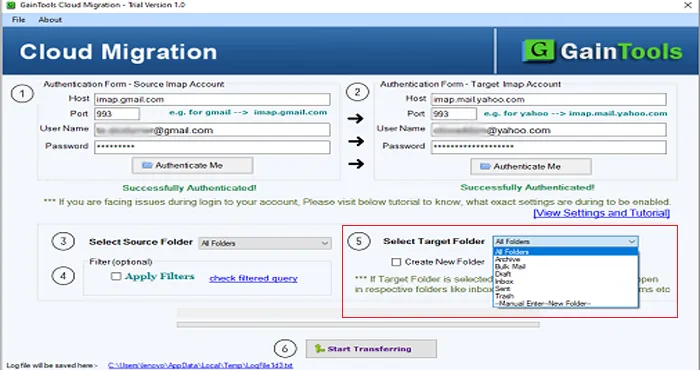
How to export data from one cloud to another cloud platform?

Use this application and export data from one webmail to another webmail account. Here are the steps-

+

Initially, download and install Cloud Conversion Tool on your system.
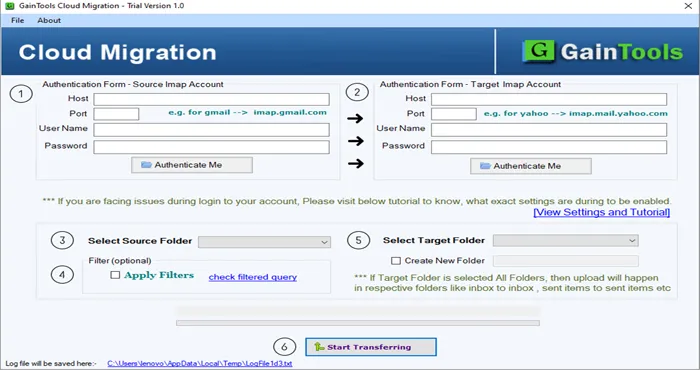
download cloud migration tool
+

Now, provide host address and login details of the account from which you want to transfer the data.
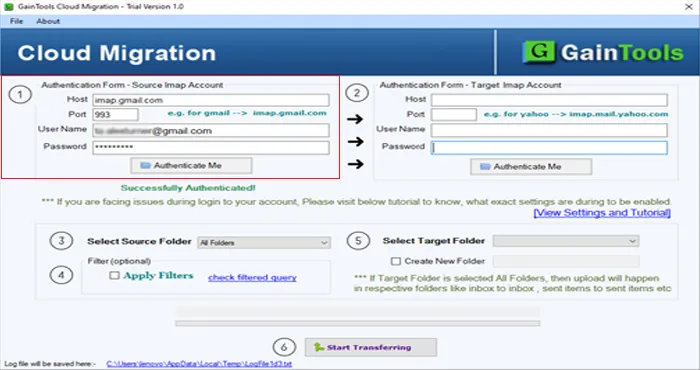
hostname cloud account
+

After that, provide host address and login details of the account in which you want to move the data.
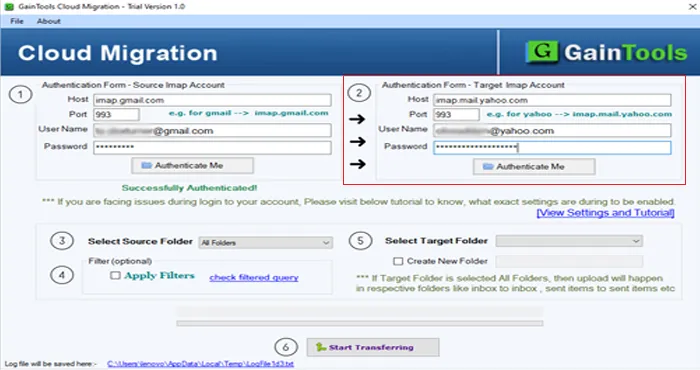
imap host login
+

Select a source folder like Inbox, Outbox, drafts, etc.
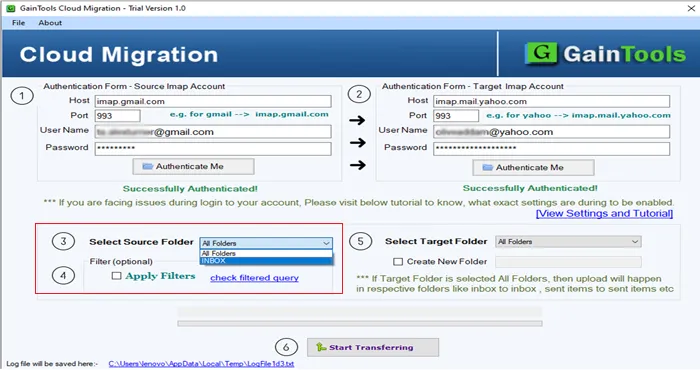
choose source folder
+

Click on Apply Filters to filter the database.
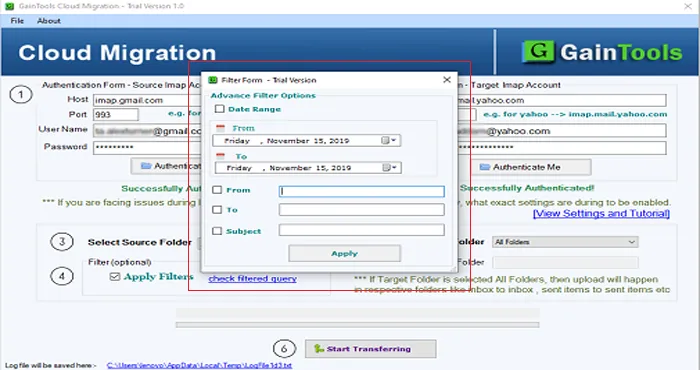
apply filter

IMAP Migration Tool FAQs

+

No, the utility is designed for Windows OS. You can’t run it on Mac OS.

+

The software swiftly migrates cloud emails in a short time period time. However, it somehow depends on the amount of data you are migrating.

+

Yes, the provides advanced filter options by which you can easily migrate emails of a particular time period.

IMAP Migration Process Images

Step-by-step visual guide to Migrate your IMAP files

How to Use Cloud Migration Tool Software

Watch our comprehensive tutorial to learn how to migrate IMAP files in just a few simple steps

MBOX Converter Tutorial Video

Watch Tutorial

Learn how to migrate IMAP files step by step

Video Tutorial

Step-by-Step Guide

Complete walkthrough of the conversion process

Easy to Follow

Simple instructions for all skill levels

Quick Results

See how fast the conversion process is

Cloud Migration Tool Free Download

Software Name
GainTools Cloud migration Software
Version
1.0
File Size
4.17 MB
Operating System
Windows 11/10/8.1/8/7 (64-bit & 32-bit)
Download a Trial

Take the tool to evaluate by converting 10 emails from each Cloud migration folder.

Compatibility & Format

Input Formats
IMAP
Output Formats
IMAP
License
TRIAL + FULL
Language
English

System Requirements

Processor
1 GHz or faster
RAM
Minimum 512 MB
Hard Disk
100 MB free space
Display
1024x768 resolution

Client’s views about Cloud Data Transfer Tool

See what our satisfied customers have to say about their experience with our Cloud migration tool

"I have successfully exported backup of my AOL account to Gmail account using this application. The software hardly takes a few minutes to migrate emails and attachments without any hurdles."

JB

Jules Boutin

"Migrating emails from Hotmail to Yahoo account in a straight-forward manner is a challenging task for me. But after getting this brilliant utility, I performed the complete conversion without any inconvenience."

AA

Arezio Aurechio

"I want to say a big thank you to the team of developers for creating this handy application. It is useful for migrating any cloud email service data to another cloud platform. I must say all-in-one tool for cloud to cloud data migration."

DK

Sylvester Balchunas