
Search Products & Tools

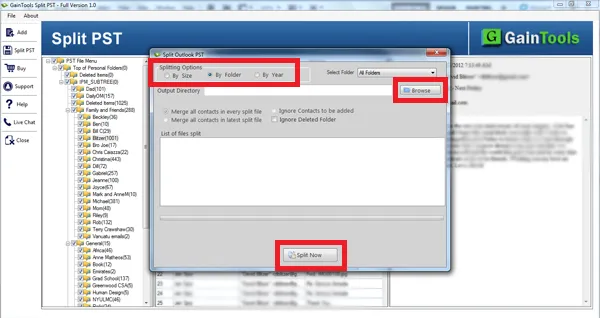
Split PST Software Interface
v1.2Free Trial
30-Day Money Back
24/7 Support
Virus Free

Download Split PST

Efficiently split your big-volume PST files into smaller PST files

Total Ratings: 333 - Average Rating: 4.8 out of 5
Split oversized PST files before they become inaccessible
Split PST files effortlessly
A highly compatible utility support split of PST created in any Outlook versions including 2003/2007/2010/2013/2016
Capable to provide desirable results by splitting desirable PST files
Advance splitting options- split by year, by size & by folder
Customized splitting support every time you use the utility
Split one PST file at a time
Split with top accuracy, no data gets damaged or corrupted
Split both ANSI and Unicode versions' PST files
A Windows tool supports Wins 8, 10, XP & Vista

GainTools Split PST Software

Split any sized PST files with top accuracy & quickly

A Safe Utility

Are you wishing to split PST files safely? Try Gaintools Split PST application which is a safe program to use. It has been evaluated for quality results. Each PST file is divided with full accuracy. No data is corrupted.

Easy to Operate

Our split PST tool has been designed to operate singlehandedly with less technical support. You can manage the program on your own even though you are not so technically sharp. The wizard is simple to understand.

Several Options to Split

The PST Splitter helps to provide the best split results by dividing PST as per your need. You are offered with several options to divide a PST file such as split by size, by folder and by year. Each option is safe.

Key Benefits & Features of Split PST Program


no file size limit

Need No Technical Assistance

Running the app on Windows is so easy. It doesn’t need you to go for deep technical help. PST files of any size can be divided by gently following 3-4 simple steps. It is a lightweight app, downloads fast. Configuration process is similar just like other programs of our site.

no file size limit

Split Desirable PST Files

The application manages to divide those Personal Storage Table files that you have selected for division. The tool has a browse menu that helps to find the required PST files from any folder or sub-folder locally. Thus, every time you get desirable file division results.

no file size limit

High Level Compatibility

n terms of compatibility, the utility supports division of any size PST files to prevent them from getting inaccessible. Both ANSI and Unicode versions PST files are supported. The utility makes division of PST files created in any Outlook versions including 2003 to the latest 2016.

no file size limit

Split PST by Folder

In this option, the utility enables to split Personal Storage Table by folder. A PST holds multiple folders including inbox, outbox, notes, messages etc… You can select any folder of your choice to split data swiftly. It is an advanced split support to find desirable results in no time.

no file size limit

Split PST by Year

In this option, you are allowed to select two different years. Here you need to select a specific date and the tool divides the particular PST file into 2 parts. The first part holds “of and prior” data whereas the other part contains “After” that date data.

no file size limit

Split PST by Size

The PST file you have selected can be divided to different sizes. It can be MB or GB. Put the desired file size in either GB or MB. The utility split it according. It creates a new folder to save the resultants.

How to divide large PST files into smaller parts?

With GainTools Split PST Software, there are only a few steps to complete the task of splitting PST file-

+

The very beginning is to download and install Split PST software on your system
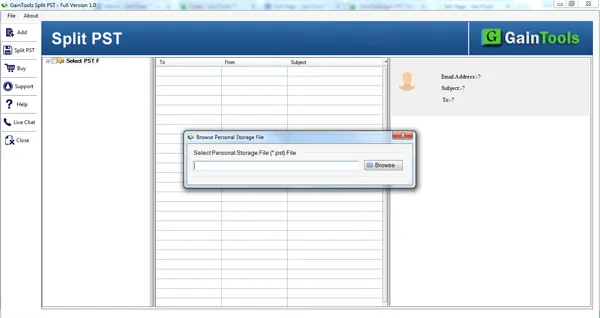
split pst software
+

Use the Browse button and add PST file from your system.
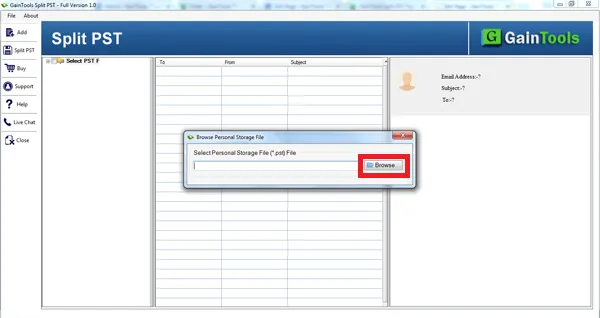
add pst file
+

Check the complete data of PST file before you divide PST file.
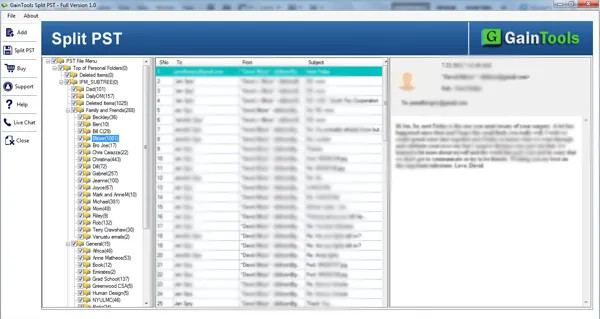
display pst file
+

The tool offers three options to split PST file – by size, by folder, and by year. Select any of the formats to divide PST file. Also, select other advanced options.
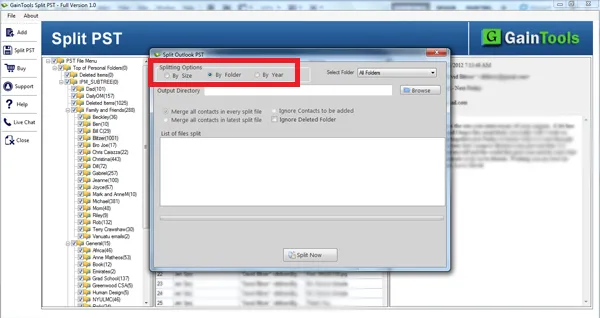
split pst file
+

Click on the Browse button and specify a location to save the PST file after splitting.
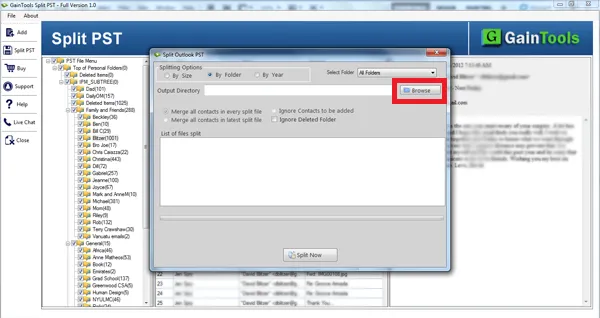
choose output location
+

To complete the process of splitting PST file, hit the Split Now button.
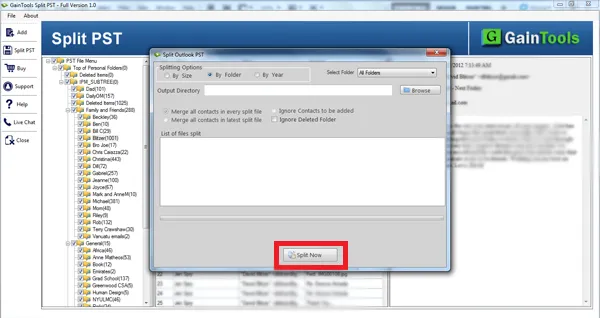
split now

Split PST App FAQs

+

It doesn’t support corrupted PST files.

+

One PST file can be divided at a time.

+

Both ANSI and Unicode versions are supported by the app.

+

Divide the folders of your choice. It doesn’t cause any objection.

Split PST Process Images

Step-by-step visual guide to convert your Split PST files

How to Use Split PST Tool Software

Watch our comprehensive tutorial to learn how to Split PST files in just a few simple steps

MBOX Converter Tutorial Video

Watch Tutorial

Learn how to Split PST files step by step

Video Tutorial

Step-by-Step Guide

Complete walkthrough of the conversion process

Easy to Follow

Simple instructions for all skill levels

Quick Results

See how fast the conversion process is

Split PST Tool Free Download

Software Name
GainTools Split PST Software
Version
1.2
File Size
2.17 MB
Operating System
Windows 11/10/8.1/8/7 (64-bit & 32-bit)
Download a Trial

Take the tool to evaluate by Splitting 10 emails from each Split PST folder.

Compatibility & Format

Input Formats
PST
Output Formats
Split PST
License
TRIAL + FULL
Language
English

System Requirements

Processor
1 GHz or faster
RAM
Minimum 512 MB
Hard Disk
100 MB free space
Display
1024x768 resolution

Client’s Views about Split PST Tool

See what our satisfied customers have to say about their experience with our Split PST conversion tool

"Words can’t define my satisfaction which I got when I divide my larges sized 20 PST files using Split PST Tool. Thanks in millions to the development team."

EE

Emily Elizabeth

"I was working with Outlook 2007 for many years. Due to which my PST file becomes very large due to which I want to split the file into parts. I used Split PST software and easily divide PST file according to year. Now, I can easily manage only required files in my Outlook."

IB

Isla Bethany

"I was facing issues in dividing my large size PST files through manual ways. I was not aware of this software. One of my colleagues suggested me this application and I have divided 10+ PST files with this application by year, size, and folder."

AM

Amelia Margaret