Search Products & Tools

Access to SQL Converter Software Interface
v1.0Free Trial
30-Day Money Back
24/7 Support
Virus Free

GainTools Access to SQL Converter

Effortlessly Move your Access Databases to SQL while Maintaining Data Integrity and Security

Total Ratings: 92 - Average Rating: 4.9 out of 5
Moves Access .mdb and .accdb file formats to SQL without any hassle.
Process multilingual text by using UTF-8 encoding.
Handles the bulk of the Access file all at once.
Offers a preview option of the document before the conversion happens.
All password-protected Access databases are processed.
Works reliably with both older .mdb and newer .accdb Access formats.
Executes the task quickly with an active progress monitor.
Allows the Select All or De-select All filter option for selective table conversion.
Automatically eliminates all the non-essential system tables during the process.
Modern graphical user interface with a self-explanatory workflow for every user.

GainTools Access to SQL Converter Tool

Transfer your MS Access databases to SQL file Efficiently

Quick Conversion to SQL

If you want to move your Access database to server-based databases for better analysis and data integration with this tool, you can move all your tables efficiently in a few clicks, with no complex process, no long waits. This software also maintains all the original data integrity and offers a live progress indicator for process tracking.

100% Secure Data Conversion

You don’t have to worry about file corruption and data loss, as this advanced tool guarantees complete security and integrity of your Access database throughout the conversion process. It won’t modify your original files, as it only reads the data to ensure data safety and reliable export to SQL file format.

Instantly Move Bulk of Access Tables

This tool is specially designed for efficient data conversion while maintaining accurate results. You can move multiple Access tables altogether without any issue. For better processing, this tool also gives the filter option to Select All or Deselect All for the target conversion of Access tables.

Significant Features of Access to SQL Converter


no file size limit

Batch and Bulk Table Conversion

For efficient and organized task operation, you can move multiple Access databases all in one go to SQL format without any data corruption or file loss. For a more targeted solution you can choose between the Select All or Deselect All table options, then select the specific table you want to convert, eliminating unnecessary effort.

no file size limit

Multi-Format SQL Support

By moving your Access database to SQL format you can share, store, and access your tables in different SQL database-supported formats, such as PostgreSQL, SQLite, SQL Server, and MySQL, easily. This feature gives a wide range of compatibility to the users for a better workflow.

no file size limit

Personalize File Location

This tool offers flexibility to you to save the converted Access database to the path that you desire. This feature gives you control and access over the resultant file. You can also create a separate file for each table for an enhanced and organized workflow.

no file size limit

Immediate Preview before Conversion

Once you upload the file, it will scan and offer a preview option on the right panel of the software, in which you have to click on the table name and review it visually. With this option you can eliminate unwanted tables before conversion and know exactly what will be exported.

no file size limit

Easy-to-Use UI

This software is developed for every user as it comes with a self-explanatory and modern GUI that even a novice can use without any issue. No technical expertise is needed to run this software.

no file size limit

Secure Database Support

If you have a protected Access file you don’t have to worry about it just upload the file and add the password. It will smartly handle all the encrypted files without any trouble. It’s a secure software that converts all your data without corrupting any files.

no file size limit

Guarantee Data Integrity and Security

Throughout the process this software ensures that all the data of the original file is safe and maintained. All the structure, content, and hierarchy of the Access database is handled carefully while preventing data corruption and file loss. This software is secured from any virus and data breach.

no file size limit

Free Demo Edition Available

If you want to examine the features of this tool before investing in the licensed version this tool features a demo version for its users without any charges. In the demo version you can access all its advanced functionalities without any hindrance.

Step-By-Step Guide

Migrating Access files to SQL format in few steps. Go through the below steps-

+

Download and double-click the GainTools Access to SQL Converter to launch it.

launch access converter
+

Click the Browse next to Access File and find you Access file that you want to work with.

select access file
+

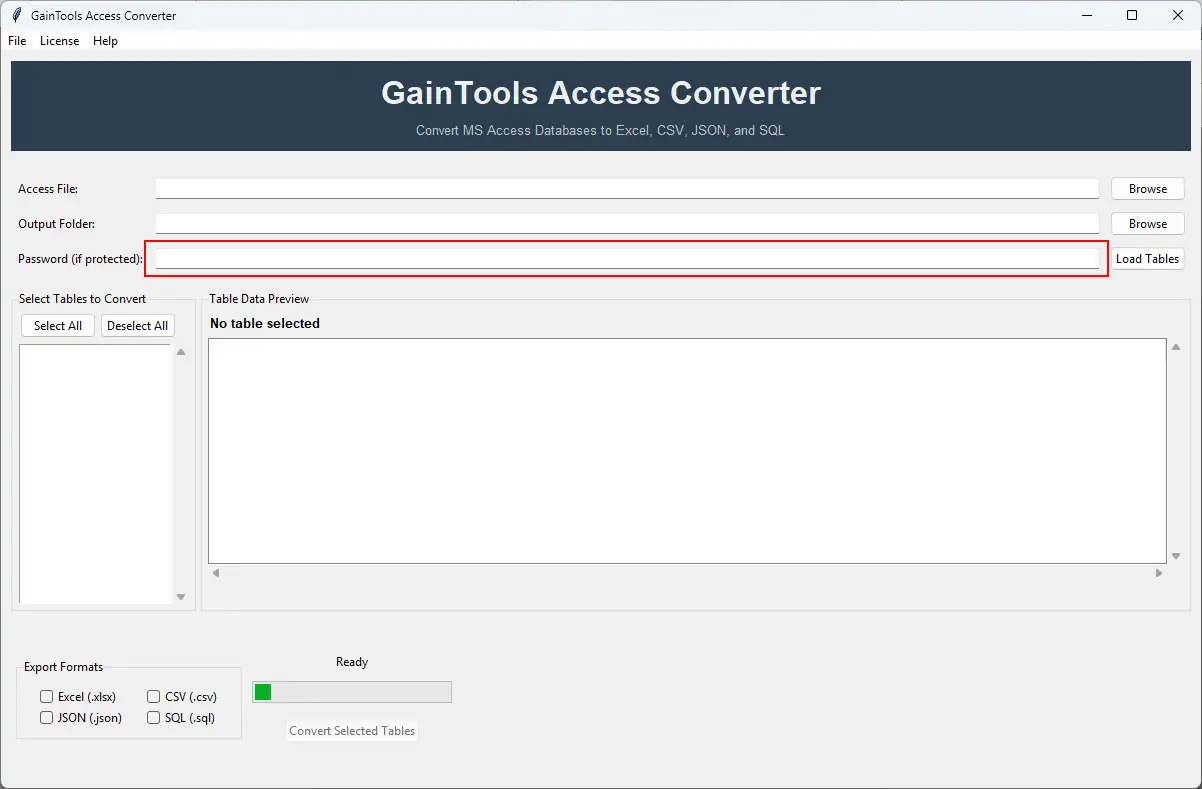
If the Access file is encrypted, enter the current password, and the Load button will smartly enable when the correct password is entered.
enter password
+

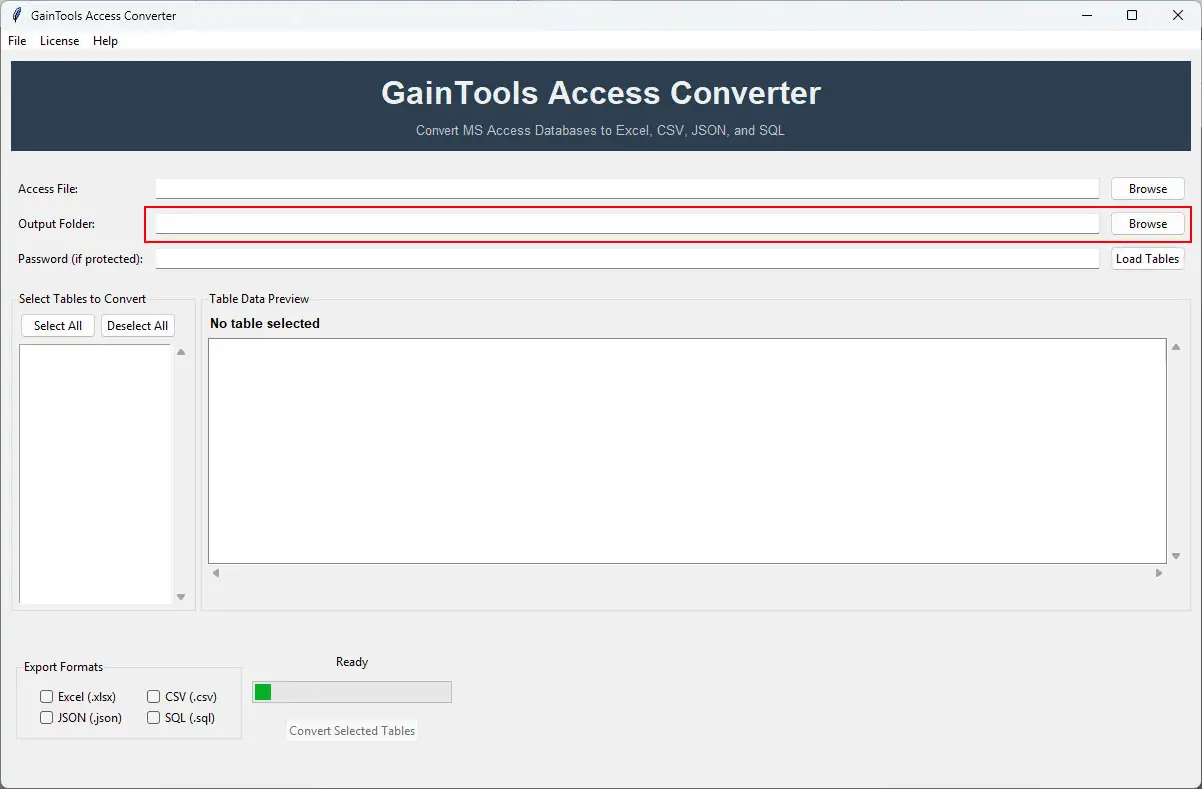
You can Browse and select the desirable destination for your output file next to the Output Folder option.
select output folder
+

Click the Load Tables button, and the software will automatically connect to your database and display all the content inside the tables in the left panel.

load tables
+

To get a preview of the uploaded file, click on any table name, and the software will show the preview of the selected table on the right panel, so that you can examine the content before conversion happens.

load tables
+

This software offers a filter type, Select All, to select all the tables, or Deselect All to clear the selection, so that you can select individual tables that you want to convert.

load tables
+

After everything is set, you can choose the SQL format that you want to convert your Access database into.

load tables
+

Finally click the Convert Selected Tables button and the conversion process will start. You can monitor the process on the progress bar and will get a Conversion Completed message once it’s done.

load tables
+

Go to your output folder and check the files there. Each table will be saved in its own file in the SQL format without any file corruption or loss.

load tables

FAQs

+

You can move unlimited tables at once with this tool, without lag or system crash.

+

Absolutely, you can trust this software with your valuable databases, as it ensures data safety and integrity of the original file.

+

It’s necessary to enter the correct password if the Access database is encrypted for the conversion process.

Access to SQL Converter Process Images

Step-by-step visual guide to convert your Access to SQL file

How to Use Access Converter Tool Software

Watch our comprehensive tutorial to learn how to convert Access databases in just a few simple steps

Access Converter Tutorial Video

Watch Tutorial

Learn how to import email files step by step

Video Tutorial

Step-by-Step Guide

Complete walkthrough of the conversion process

Easy to Follow

Simple instructions for all skill levels

Quick Results

See how fast the conversion process is

Access to SQL Tool Free Download

Software Name
GainTools Access Converter Software
Version
1.0
File Size
126 MB
Operating System
Windows 11/10/8.1/8/7 (64-bit & 32-bit)
Download a Trial

Take the tool to evaluate by previewing Access database tables. Full conversion requires license activation.

Compatibility & Format

Input Formats
MBD, ACCDB
Output Formats
SQL
License
TRIAL + FULL
Language
English

System Requirements

Processor
1 GHz or faster
RAM
Minimum 512 MB
Hard Disk
100 MB free space
Display
1024x768 resolution

Related Blogs & Resources

    There are no posts available

Client's views about Access to SQL Converter App

See what our satisfied customers have to say about their experience with our Access Converter tool

"I have been facing issues with my Access database because of heavy data and wanted to switch to SQL but manual methods were very time-consuming and complex to use. One of my colleagues suggested this tool. This tool is an ultimate game-changer for me. I was so stressed about how to do it but with this tool, all I did was follow the steps and in a few clicks, a healthy SQL file was saved on my system without any data corruption. Definitely a recommendable tool for beginners!"

RL

Roy Lee

"Such an advanced app, do you want a filter option? Bulk conversion? Data safety? Efficient workflow? It has it all, and personally, I feel the free demo version is the best part, where I was able to explore all its features, and then I invested in the premium version, which also comes with lifetime validity. Thank you, GainTools, for developing this app."

DK

Daniel King

"I really need to thank the customer support team. As I was facing some issues regarding the tool pricing and the license version, but they cleared all my doubts and gave me the best possible advice. Truly a supportive staff."

RB

Richard Barrios