Search Products & Tools

Access to Excel Converter Software Interface
v1.0Free Trial
30-Day Money Back
24/7 Support
Virus Free

GainTools Access to Excel Converter

Effortlessly Move your Access Databases to Excel while Maintaining Data Integrity and Security

Total Ratings: 92 - Average Rating: 4.9 out of 5
This tool works to convert all the tables of Access database instantly in Excel format.
It supports all the old and latest version of Access (MDB & ACCDB).
All the data will transfer in proper structure like Tables, fields, headers, and records.
This tool run in standalone mode, no need to install Access software
User can choose the format according to their need (.XLSX / .XLS)
User have option to select specific data and export it.
Heavy or large Access file can easily transfer in Excel format.
Tool safely read corrupted, encrypted, or large size databases file.
This tool is a beginner-friendly application which have a user-friendly-interface.
This tool fully protects your data during and after the conversion.

GainTools Access to Excel Converter Tool

Migrate your MS Access databases to xls, xlsx file format quickly

Zero Manual Work, Fully Automated Conversion

User don’t need to copy-paste the data because this tool will automatically detect all the data and instantly convert all the data in Excel format.

Accurate Mapping of Fields & Table Structure

All the element of columns, data types, and records Excel sheet or rows & columns of Access will export exact same. There is no data mismatch or inconsistency.

Table-Level Selection for Flexible Transfer

If user want to convert particular data in Excel format, then user need to select data table-wise and it will help user to convert particular data in their desire format.

Significant Features of Access to Excel Converter


no file size limit

Dual Format Access Support (MDB & ACCDB)

MDB (Older Version) & ACCDB (Latest Version) both are the major file format of Microsoft Access. This tool will easily read all the old and new formats. It will allow users to convert their data without facing any trouble. No requirement of manual setting, it will automatically detect all the structures. It supports cross-version migration so users don’t need to struggle with compatibility.

no file size limit

Export Data to XLSX & XLS

User convert their data in their desirable format of excel like .xls and .xlsx, it will helpful especially when user need to open their data on both older or latest versions of Excel. This feature is flexible for those companies whose teams use mixed Excel versions. After conversion excel file become fully editable without formatting conflicts.

no file size limit

3. Selective Table Conversion

It will ensure that table structure, fields, data types, numeric values, text fields, dates and indexes all the data will transfer in structured manner, it will provide user zero data loss guarantee. Multi-layer validation mechanism ensures the maintenance of data integrity after conversion. It will safely convert Sensitive or complex fields.

no file size limit

High Data Accuracy

If there are multiple tables stored within the Access database (Customers, Orders, Products, Suppliers, etc.), the tool scans them all and displays a list. The user can easily choose to convert a single table, multiple tables, or the entire database. This feature is very helpful for multi-department databases where different teams need different table exports. Batch table conversion significantly reduces processing time.

no file size limit

Large File Handling Capability

This software is completely standalone it's not mandatory to have MS Access or MS Excel installed on the system. This feature is especially helpful for users who don't have Microsoft Office installed on their systems. This advantage is especially helpful in IT environments where installing Microsoft Office is not possible. Standalone architecture allows dependency-free workflow and smooth automation.

no file size limit

100% Safe & Clean Processing

Advanced scanning technology reads databases quickly, even large files. This engine automatically detects table structures and performs rapid conversions. Even large Access databases can be converted in seconds or minutes. The high-speed engine is perfect for time-sensitive workflows (daily reporting, analytics). The system does not hang or lag during processing, even with heavy data files.

no file size limit

User-Friendly Interface

The interface is designed to be clean, straightforward, and beginner-oriented. You don't need technical knowledge or complexities to handle it. The steps are clearly visible select the file, choose the tables, save the output that's it. The UI makes workflow fast and error-free with minimal distractions. Technical users enjoy advanced options, while non-technical users can get by with the basic view.

no file size limit

Standalone Application

GainTools software is perfectly optimized for Windows PC users. It runs smoothly on Windows XP, Vista, 7, 8, 8.1, 10, and 11. A high-performance, lightweight experience is ensured. Multi-version Windows support ensures compatibility for enterprise-level IT setups. No special hardware requirements runs comfortably on a standard PC/Laptop.

Step-By-Step Guide

Steps to Convert Access to Excel Using GainTools Converter

+

First, you need to install the GainTools Access to Excel Converter

launch access converter
+

Click on the Browse option and select the file extension MDB or ACCDB. It will instantly scan the data.

select access file
+

User can check the entire database structure, like tables, record count, fields, etc. User can choose specific table according to the requirement.
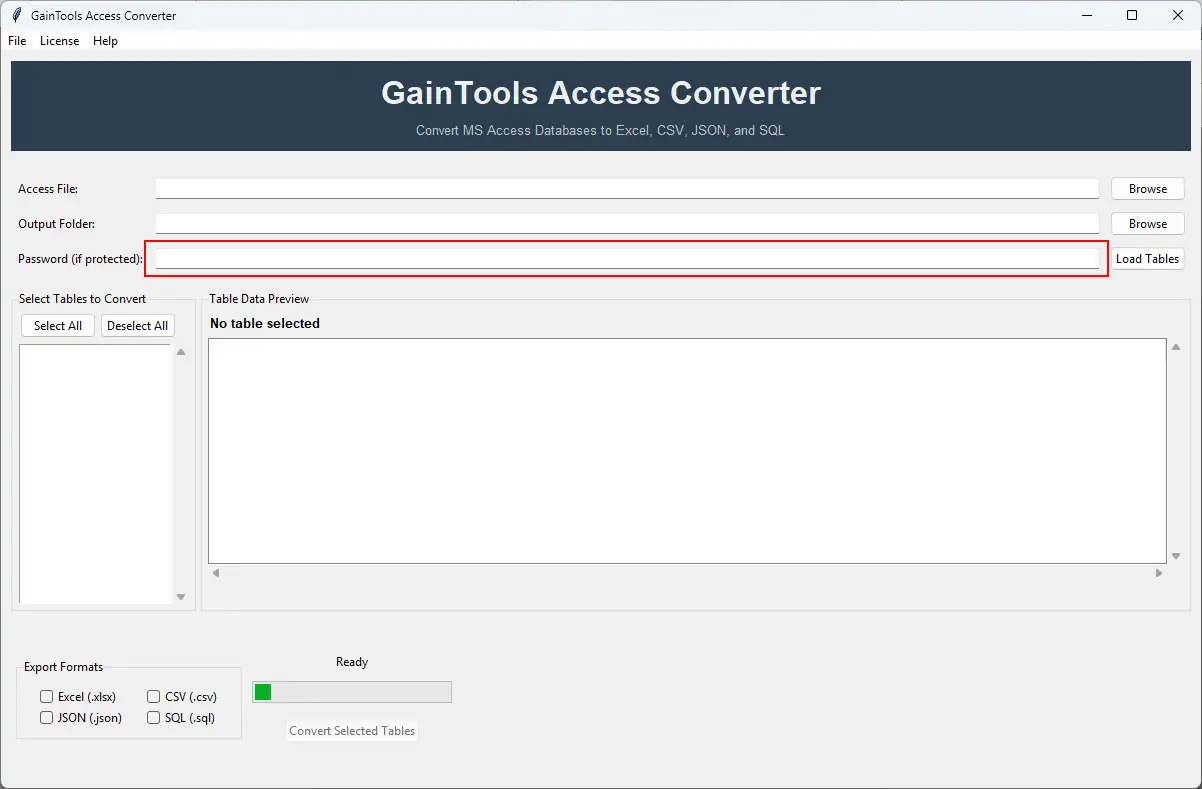
enter password
+

User can choose modern format (XLSX) or classic format (XLS) according to the requirement
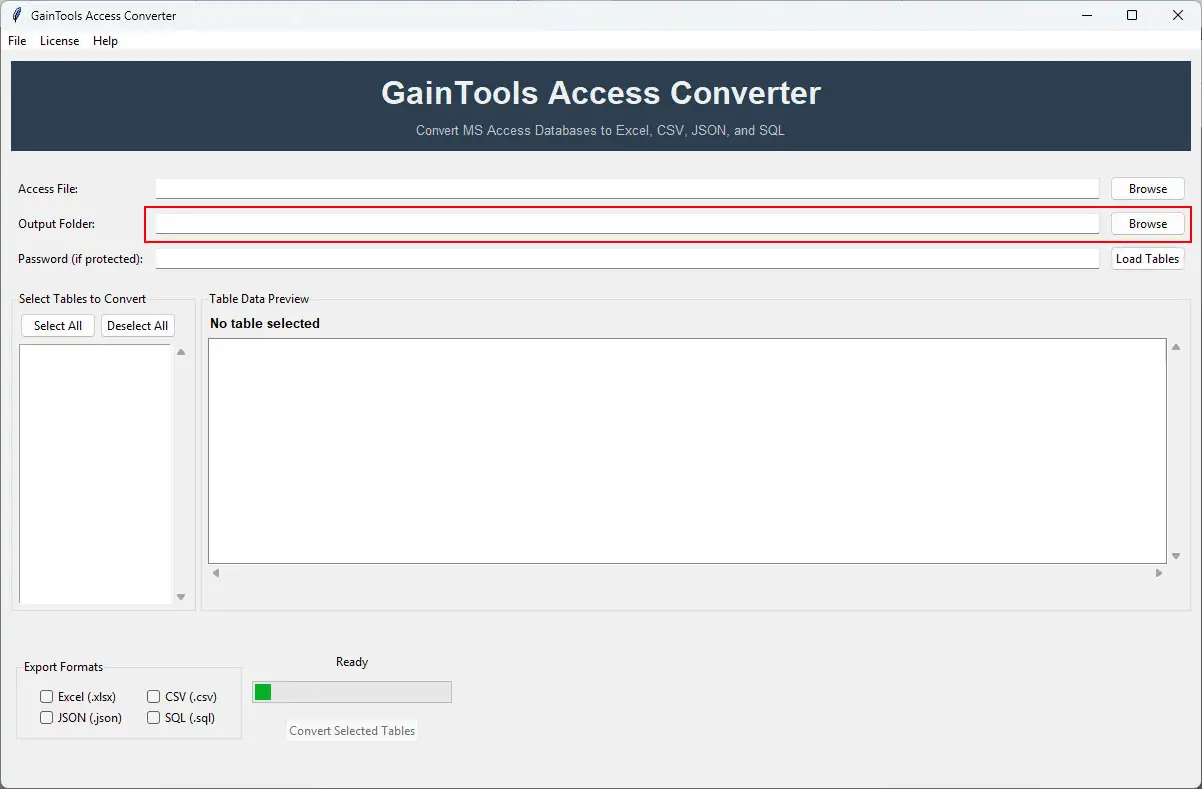
select output folder
+

Choose the destination where you want to save your data

load tables
+

Now click on the convert button and export all the data.

load tables
+

The software will display a success message after the conversion is complete. You can verify the data by directly opening the output file.

load tables

FAQs

+

Yes, all the data like Tables, fields, records will 100% safe during and after the conversion.

+

Yes, user can easily export password-protected Access files

+

No, it is a standalone application which don’t need any application to be installed.

Access to Excel Converter Process Images

Step-by-step visual guide to convert your Access to Excel file

How to Use Access Converter Tool Software

Watch our comprehensive tutorial to learn how to convert Access databases in just a few simple steps

Access Converter Tutorial Video

Watch Tutorial

Learn how to import email files step by step

Video Tutorial

Step-by-Step Guide

Complete walkthrough of the conversion process

Easy to Follow

Simple instructions for all skill levels

Quick Results

See how fast the conversion process is

Access to Excel Tool Free Download

Software Name
GainTools Access Converter Software
Version
1.0
File Size
126 MB
Operating System
Windows 11/10/8.1/8/7 (64-bit & 32-bit)
Download a Trial

Take the tool to evaluate by previewing Access database tables. Full conversion requires license activation.

Compatibility & Format

Input Formats
MBD, ACCDB
Output Formats
Excel
License
TRIAL + FULL
Language
English

System Requirements

Processor
1 GHz or faster
RAM
Minimum 512 MB
Hard Disk
100 MB free space
Display
1024x768 resolution

Related Blogs & Resources

    There are no posts available

Client's views about Access to Excel Converter App

See what our satisfied customers have to say about their experience with our Access Converter tool

"Our company need to open old Access database into Excel format for analyzing the data, we were struggling in conversion process, then through the blog we came to know about this application and honestly This tool successfully transferred all the data into Excel format within just 10 minutes."

RL

Roy Lee

"I faced so many problems in converting Large MDB files into Excel format, but this tool converts all the data smoothly without any hassle. Honestly this application makes my work easier. Highly-recommended."

DK

Daniel King

"We need to export Access database in Excel formal on a daily basis, and by this application all the work becomes so easy, fast, reliable, and easy. We don’t need to struggle anymore. Best application"

RB

Richard Barrios