Search Products & Tools

Access to CSV Converter Software Interface
v1.0Free Trial
30-Day Money Back
24/7 Support
Virus Free

GainTools Access to CSV Converter

A advanced application to export bulk of Access databases to CSV within a few minutes.

Total Ratings: 92 - Average Rating: 4.9 out of 5
This tool converts all the MS Access (.mdb/ .accdb) files into a standardized CSV format.
It supports single-table or multiple-table export from the same database
It exports all the data in its original format with 100% accuracy
It converts large-sized Access databases smoothly without crashing
No need to install MS Access because it is a standalone tool
It can be easily used by beginners, and it has a user-friendly interface
Fast processing engine that converts bulk data instantly
Preview mode allows users to see the data before conversion.
Error-free & secure conversion—no data loss, mismatch, or duplication.
Free trial available to test all major features before purchase.

GainTools Access to CSV Converter

Convert your MS Access databases to CSV file formats hassle-free

Direct Table Access for CSV Export

GainTools Without requiring any prior setup, Access to CSV Converter rapidly converts straight Access tables to CSV format. Even non-technical individuals may transfer data using this automated technique without any training because it is so easy and seamless. The software's straightforward operation, which involves just choosing a file and clicking the export button, almost eliminates the possibility of human error. The CSV file is clean, organized, and ready for analysis after conversion, making it simple to use in databases, Excel, Google Sheets, and analytics software. All things considered, this functionality makes data transfer extremely accurate and fast.

Support for Quick and Batch Conversion

With just one click, GainTools' batch conversion capability can convert all of the tables in an Access database to CSV. Users may save time and work by not having to export each table individually. Large enterprises, data analysts, and IT teams that need to manage a lot of data would particularly benefit from this feature. The program properly maintains output quality, doesn't crash, and is stable even while processing large amounts of data. Large-scale data migration initiatives are incredibly effective thanks to this functionality.

Clean Output & Consistency of Data

When transferring data from Access to CSV, the application accurately maintains each column, row, field name, numeric value, special character, and date format. There are no duplicate rows, null value problems, or incorrect formatting in the output file, which is neat, organized, and error-free. Because of this uniformity, the CSV file may be loaded straight into any database system, spreadsheet application, CRM, or analytical tool without the need for any cleaning. In this manner, the procedure is dependable and smooth as customers consistently receive high-quality, analysis-ready data.

Highlighted Features of Access To CSV Converter


no file size limit

Supports MDB & ACCDB Formats Completely

It can seamlessly handle all the old (.mdb) or the latest (.accdb) version of MS Access. This tool will automatically database schema without manual configuration. This tool is ideal for mixed versions (2010, 2013, 2016, 2019, 2021).

no file size limit

Clean CSV Output with Proper Formatting

CSV is a universal plain-text-based data format. This software converts Access data into structured CSV rows and columns without losing critical information. It handles all the details correctly: Quotes, delimiters, commas, special characters. The output file opens instantly in other systems/software. You can easily import the data into Excel, Notepad, Python, cloud servers, or cloud systems.

no file size limit

Zero Data Loss Conversion Process

This software maintains all the components, like table structure, row count, field names, and field types. All the data, like Numeric values, long text (memo), dates, and fields, will convert into an accurate format. Large records will also easily export without any corruption. Multi-layer validation ensures that CSV output is 100% accurate.

no file size limit

Multi-Table Conversion Support

If there are multiple tables within an Access file, the tool automatically lists them. You can export a single table, multiple tables, or the entire database. Perfect for batch conversion workflows. It's easy to generate separate CSV files for multiple departments/applications. Time-saving feature for daily or frequent database extraction.

no file size limit

Standalone Utility (No MS Access Required)

The software is completely standalone; you don't need to install Access. This benefit is perfect for machines that don't have the Office suite installed. Dependency-free architecture makes the conversion process smooth. Runs smoothly even in offline environments, isolated systems, and lab PCs.

no file size limit

Fast Scanning & High-Speed Conversion Engine

Optimized engine detects database structure fast and generates CSV output. Extra Details Large Access files containing thousands of records are also handled by high-speed conversion. Process is lightweight, does not slow down the system. Perfect performance for bulk extraction uses cases.

no file size limit

User-Friendly Interface for All Users

The interface has been designed to be clean and beginner-friendly so that any user can use it without training. Step-by-step process removes confusion. Allows output flexibility for advanced users. Minimal UI ensures fast decision-making and error-free workflows.

no file size limit

Works on All Windows Versions

The tool operates smoothly on all versions from Windows XP to Windows 11. Provides excellent performance even on low-configuration systems. No heavy installation or setup required. Fully compatible tool for Enterprise IT environments.

Step-By-Step Guide

Exporting Access databases to CSV format easily. Go through the below steps-

+

First, you need to download the application on your system

launch access converter
+

Click on the Browse button and choose a format like .mdb or accdb, and the software instantly scans all the data.

select access file
+

All tables in the database will be automatically listed. You can select specific table (s)
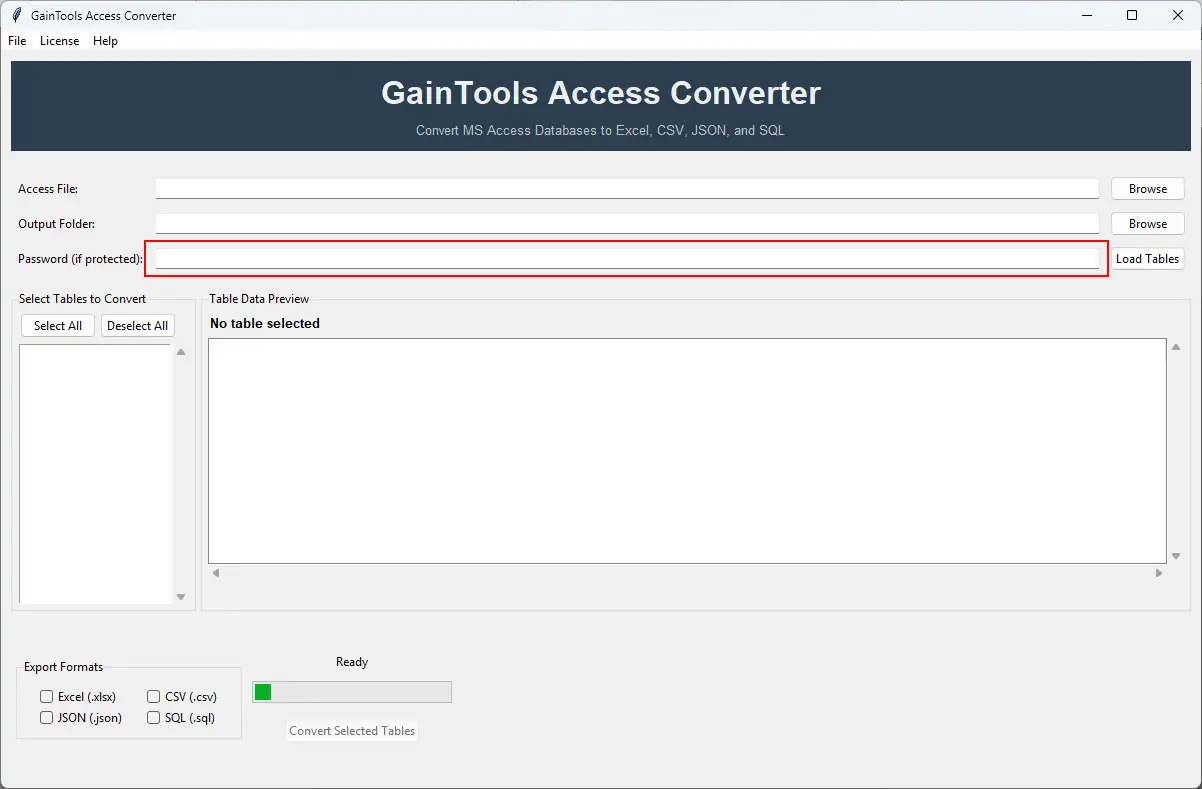
enter password
+

Then you need to select the location where user want to save their data.
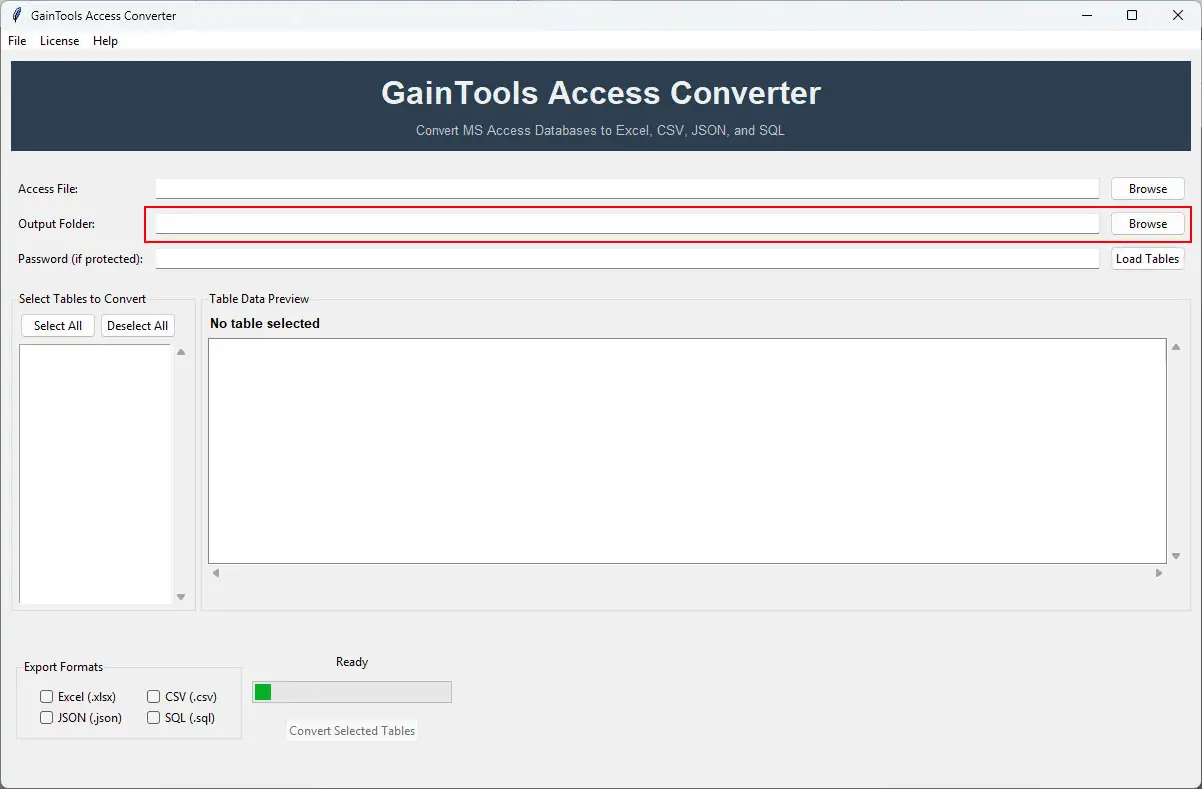
select output folder
+

Tab on the convert now button, the tool will instantly create CSV output

load tables

FAQs

+

No, it is a standalone tool, no requirement for MS Access

+

Yes, this software supports multi-table selection.

+

CSV file format almost supported by most platforms, like Excel, Google Sheets, Notepad, Python, SQL servers & more.

Access to CSV Converter Process Images

Step-by-step visual guide to convert your Access to CSV file

How to Use Access Converter Tool Software

Watch our comprehensive tutorial to learn how to convert Access databases in just a few simple steps

Access Converter Tutorial Video

Watch Tutorial

Learn how to import email files step by step

Video Tutorial

Step-by-Step Guide

Complete walkthrough of the conversion process

Easy to Follow

Simple instructions for all skill levels

Quick Results

See how fast the conversion process is

Access to CSV Tool Free Download

Software Name
GainTools Access Converter Software
Version
1.0
File Size
126 MB
Operating System
Windows 11/10/8.1/8/7 (64-bit & 32-bit)
Download a Trial

Take the tool to evaluate by previewing Access database tables. Full conversion requires license activation.

Compatibility & Format

Input Formats
MBD, ACCDB
Output Formats
CSV
License
TRIAL + FULL
Language
English

System Requirements

Processor
1 GHz or faster
RAM
Minimum 512 MB
Hard Disk
100 MB free space
Display
1024x768 resolution

Related Blogs & Resources

    There are no posts available

Client's views about Access to CSV Converter App

See what our satisfied customers have to say about their experience with our Access Converter tool

"I was trying to convert my data into CSV format, but the manual method takes so much time in conversion, then I tried this application and it converted all my data into CSV format. This tool provides impressive results. Highly-Recommended"

RC

Robert Carlson

"Our ERP System supports only CSV format. Previously, manual exports resulted in errors. Now, every report is available in a clean .csv file. The easy-to-use interface has made the job simple."

CD

Collin Dougherty

"This tool makes my work so easy; I no longer need to use the manual method. Its interface is so easy, fast, and 100% accurate. This application helped me convert multiple tables at once without any errors. It is a truly time-saving and reliable tool."

GC

Gerald Camarillo