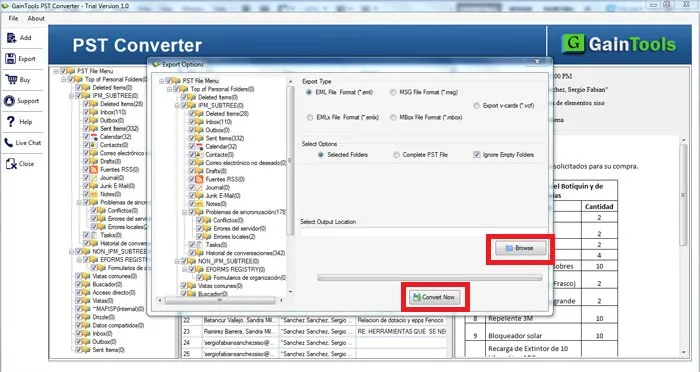

Search Products & Tools

PST Converter Software Interface
v1.0Free Trial
30-Day Money Back
24/7 Support
Virus Free

Download PST to EML Converter

Instant export of Outlook PST file to EML format without any data omission

Total Ratings:306 - Average Rating: 4.8 out of 5
Easy to install and run application
Design to easily meet the goal of export PST to EML
Allow you to export entire data of PST file to EML format
Allow you to export only selected folder of PST
Capable to scan all sized EML files
Option to ignore empty folders
Deep file filtration feature to export desirable PST files
Give opportunity to export any accessible PST file
Risk free migration is achieved
Provide clear preview of the exported data
A user friendly app
Work on only Windows platforms
Compatible to export PST data of any MS Outlook version including 2003, 2007, 2010, 2013 and 2016

GainTools PST to EML Converter

A sophisticated tool to Transfer all emails from MS Outlook PST file to EML file formats

A Sophisticated Tool

This PST to EML migration utility is an extremely sophisticated app. It works smoothly to make conversion error free and according to user’s choice. The converter is capable to export almost all PST files without any interruption.

A Reliable Utility

This is a reliable program to try. You can trust the app for smart conversion of PST data to EML format. Whole data quality is retained. There is no change in the content structure and body. The utility only changes the file format.

Make Outlook Data Flexible

You all know that MS Outlook files cannot be accessed to any other email clients. But with the use of PST to EML Conversion, you can easily export Personal Storage Table to Thunderbird, WLM, Apple Mail and many other EML supportive email clients.

Key Essential Features of PST to EML Converter


no file size limit

Export PST to EML Effortlessly

This cool app makes migration process from Personal Storage Table to EML so easy to achieve. The tool is highly interactive, featuring a few tabs to export into EML format in just a few minutes. Automatic conversion is processed as you hit the tab “Convert Now”. The tool just needs a few directions for yours to achieve migration effortlessly.

no file size limit

Export Only Desirable PST Files

The utility enables you to pick the PST file of your choice. It means each time the conversion result is achieved as per your desire. The app has “Add File” feature that allows you to search a particular PST from any folder of your computer. Easy access is provided to a particular MS Outlook file to provide conversion results according to your wish.

no file size limit

Convert Entire PST Items

This export tool is reliable. When a PST file is selected for migration, the app has capacity to scan the entire folders of PST to make conversion accurate. It reads inbox, outbox, messages, contacts, journals and calendars to extract them completely. Each item of a PST file is exported without losing accuracy. The utility performs migration without losing the essence of migration.

no file size limit

Convert Selected PST Folder

Did you know how much flexible the app is? It allows you to scan the entire PST folders and after you can customize migration by exporting a particular folder of a PST file. It means it allows you to export those data that you find extremely important to retain. The app gives you flexibility to extract only Inbox, Outbox, Calendar, Contact or Journal. Any folder of a PST file can be extracted and save to EML format.

no file size limit

Provide Preview of Selected PST

Converter PST to EML scans the particular PST file and shows you clear preview of the particular file in just a few seconds. As the file is scanned, the wizard of the app features the list of folders the PST file holds. You can click a particular folder to see how many items it holds and later you can click on a particular item to see the text it has.

no file size limit

Easy to Operate

The sophisticated app has been launched into 2 formats to meet with your needs. You are free to choose any suitable format. The license of the app can be achieved into personal format and a commercial format. The personal format is affordable than commercial. Users can differentiate between them according to their needs. The commercial version meets the requirements of small to big budget organizations.

no file size limit

Free Trial for Every Needy

Don’t wait much to try the app. If you have a heap of PST files that you want to switch from EML, the license of the app is meant for you. But before that it is must to try the demo version to evaluate the tool performance. This is a 30-day free trial offer which offers export of maximum 10 items per PST folder. For complete migration, it is must to buy the full version of the app.

no file size limit

Save PST to EML

When it comes to save PST data to EML format, the utility allows you to set the output location. You can save migration to any location in the local computer including Drive C. The app lets you to decide the output location. You can save to a new folder or an existed one. It doesn’t create any problem to save the PST emails to EML.

How to transfer PST file to EML file format?

PST to EML Converter software offers a simplified interface to export PST files to EML. Here are the steps.

+

The first step is to install and run PST to EML Converter on your system.
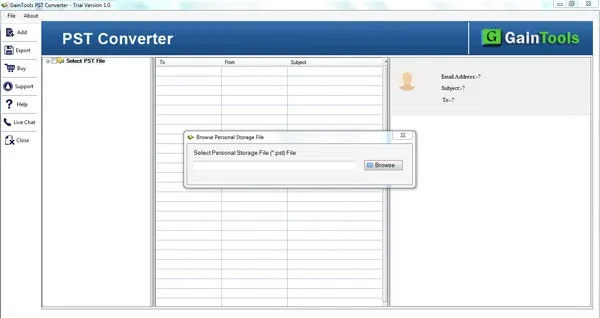
download pst converter
+

The next step is to add Outlook PST file to whom you want to export.
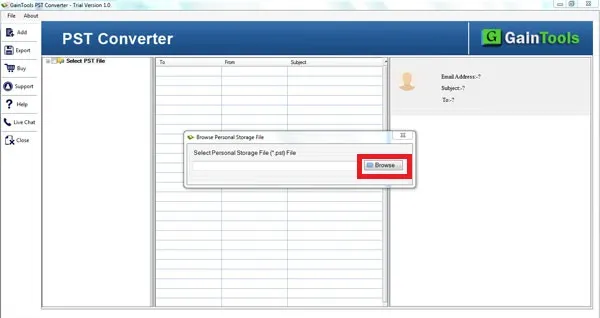
choose file folder mode
+

Once the PST file is loaded on the software panel. Users get a complete view of PST file & then select items to export.
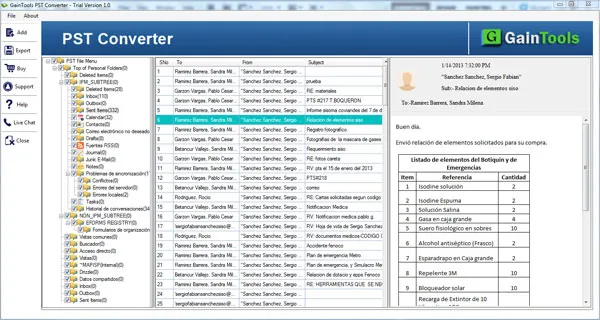
preview pst
+

After that, select EML file format in which you want to export.
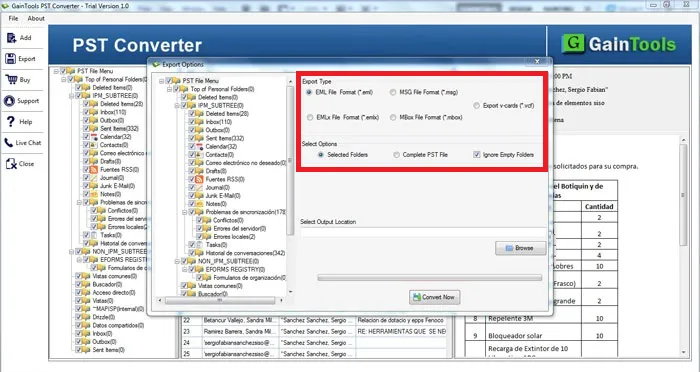
select file format
+

Choose an output destination to save EML files.
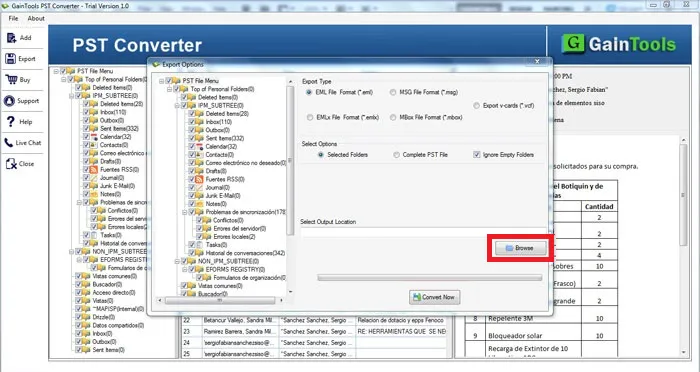
select output location
+

At last, click on the Convert Now button to begin the conversion task.
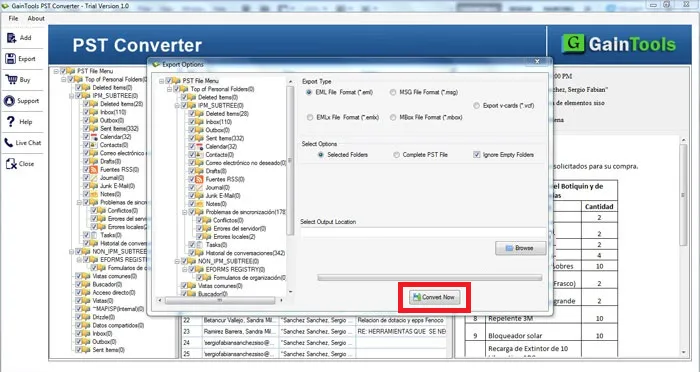
export pst

PST to EML Converter App FAQs

+

No. You cannot operate this app on any other OS accept Windows OS. It supports Windows 10/XP/Vista/8/8.1

+

The PST to EML program has been designed to export only healthy PST files that you can access easily.

+

The free trial opportunity is provided to evaluate the tool. It is also necessary to avoid the future of returning the product. Therefore, we recommend to try before purchase. It will make your shopping valuable.

PST to EML Converter Way Images

Step-by-step visual guide to convert your EML files

How to Use PST to EML Converter Tool Software

Watch our comprehensive tutorial to learn how to convert PST to EML files in just a few simple steps

PST Converter Tutorial Video

Watch Tutorial

Learn how to convert PST to EML files step by step

Video Tutorial

Step-by-Step Guide

Complete walkthrough of the convert PST to EML process

Easy to Follow

Simple instructions for all skill levels

Quick Results

See how fast the convert PST to EML process is

PST to EML Converter Tool Free Download

Software Name
GainTools PST to EML Converter Software
Version
1.0
File Size
2.18 MB
Operating System
Windows 11/10/8.1/8/7 (64-bit & 32-bit)
Download a Trial

Take the tool to evaluate by converting 10 emails from each PST folder.

Compatibility & Format

Input Formats
PST
Output Formats
MBOX, EML, EMLX, MSG
License
TRIAL + FULL
Language
English

System Requirements

Processor
1 GHz or faster
RAM
Minimum 512 MB
Hard Disk
100 MB free space
Display
1024x768 resolution

Client’s Views about PST to EML Converter

See what our satisfied customers have to say about their experience with our PST to EML Converter tool

"I liked the instant conversion rate of your software. By this, I am capable to export many PST files into EML format to access Outlook data to Thunderbird application."

PA

Pedro Araez

"I used this software a week ago and I am very glad by the quick conversion of this software. I successfully complete the conversion with misplacing any file and without changing the original structure of PST file."

SB

Sylvester Balchunas

"By the manual method, I tried to convert PST file into EML format but all my data gets messed up and I was so confused while utilizing the method. After that, one of my friends recommend me PST to VCF Converter and I found this tool so smooth and easy to handle."

AA

Arezio Aurechio