
Search Products & Tools

ost converter
v1.0Free Trial
30-Day Money Back
24/7 Support
Virus Free

Download OST to MBOX Converter

Reliable application to convert OST files to MBOX files

Total Ratings: 865 - Average Rating: 4.8 out of 5
Accurate conversion every time
Export entire data of OST to MBOX
Export only use’s selected OST files
Enable to save MBOX files locally
Allow to export data of any MS Outlook version 2003/2007/2010/2013/2016
A Windows conversion app to run on Windows 8/10/XP/Vista (32+64 bit)
Export OST to Thunderbird and several other MBOX supportive email clients with less effort

GainTools OST to MBOX Converter

A brilliant app to use successfully for accurate migration from MS Outlook OST to Thunderbird and several other platforms

Export with Accuracy

This exporter OST mailbox to MBOX is capable to maintain accuracy during conversion. Export any OST file, the size of the file doesn’t come in the way. Entire properties exported safely with the conversion app.

Conversion Limitless

Once you grate the license of the app, it offers unlimited data conversion. You are free to use this solution as many times as you wish. Conversion of OST is achieved without any obstacle.

Free Trial

Never ever mind to try the tool for free. This is a lifetime free trial to help examining the key efficiencies of the app. The free version works exactly the paid version is. Experience the tool performance today.

Key Characteristics of Converter OST File to MBOX


no file size limit

Export Data Effortlessly

This exporter OST data data to MBOX is highly compatible to migrate data smoothly and with no effort. You have to click just a few simple tabs to convert OST to MBOX. The file size doesn’t come in the way of data conversion. The exporter reads every OST file to make them ready for migration.

no file size limit

Show Preview

As the OST file is downloaded, you can see the preview of that particular file. There are three sections to showcase preview. The exporter features numbers folders, number of items in each folder and the content of each item. Complete inside of an OST file is provided by the app.

no file size limit

Support Filter Button

The smart converter lets you choose the OST file that you actually want to convert. It has deep file filter feature that filters data so fast. You are allowed to search manually for a particular OST file. Open any local folder and drive to locate the particular OST file for migration.

no file size limit

Save Export to Desirable Location

Before heating the conversion button, decide the output location of the converted OST. This conversion app allows you to form a new folder to save data or use an already existed folder to save the newly created file. Both ways are safe. In this way, you can easily manage your data.

no file size limit

Error Free Migration

The OST to MBOX Converter is safe to try. You are allowed to perform migration without getting any error. Your OST files are safe during migration. No folder is damaged and corrupted. It manages to export entire data like Inbox, Outbox, Contacts, Calendars, and Events etc… Every time the conversion result is achieved with full accuracy.

no file size limit

Highly Customized Conversion

This is a magnificent app. It makes your conversion not only accurate but also gives you flexibility to achieve export results as per your desire. The app has advanced conversion support that allows you to select a particular folder of an OST file for migration. You can select any folder including inbox, outbox or contacts.

no file size limit

Access Outlook to Multiple Platforms

With the help of this OST file to MBOX conversion, users find the freedom to access MS Outlook to multiple platforms like WLM. Thunderbird, Apple Mail and many more… Users can easily plan to switch from Outlook OST to WLM or Thunderbird. The flexibility cannot be imagined without the help of a third party support.

no file size limit

Free Conversion Trial

Download the free conversion trial of the app in your Windows based system. This Windows tool is available for lifetime free trial. Once you try the free version, apply for its full license from GainTools. The demo is replica of paid version and the best way to learn about the app.

How to convert OST file into MBOX format?

Conversion of OST file to MBOX format becomes so simple when you download OST to MBOX Converter.

+

The foremost step is to download and install the application on your PC.
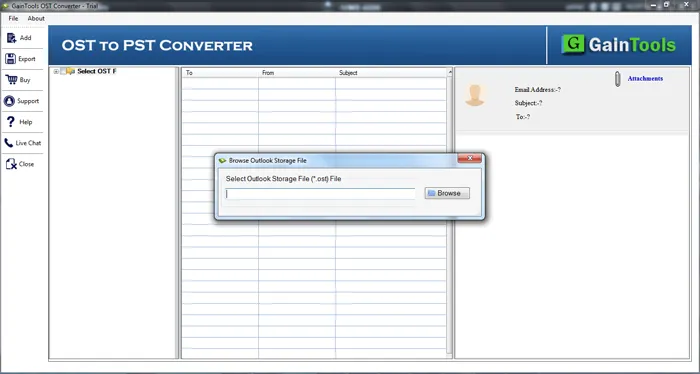
download OST converter
+

Add OST file with the help of the Browse button whom you would like to export.
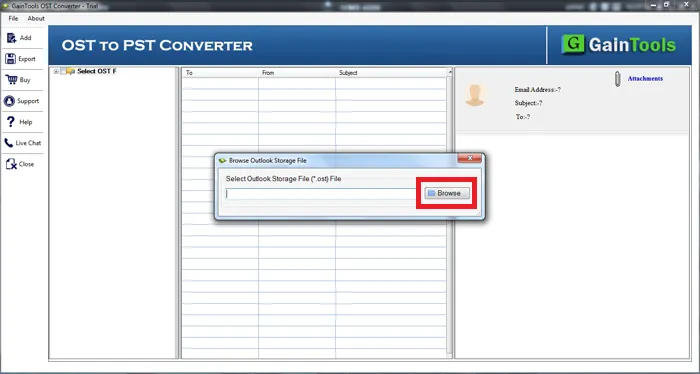
choose file folder mode
+

Find the complete preview of OST file. You can select subfolder from the left pane and view all items before the conversion. Also, select desired items that you want to export.
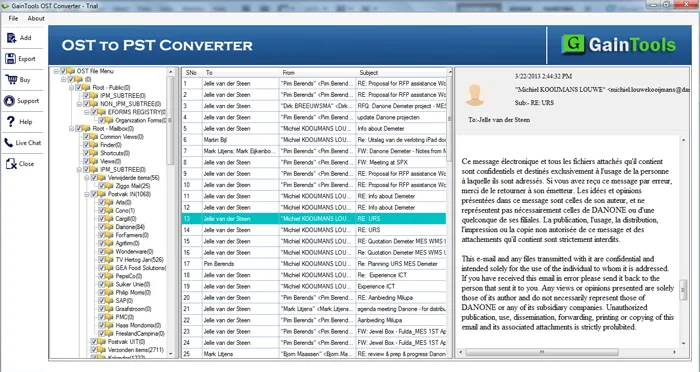
preview OST
+

Select the MBOX file format in which you want to export.
select file format
+

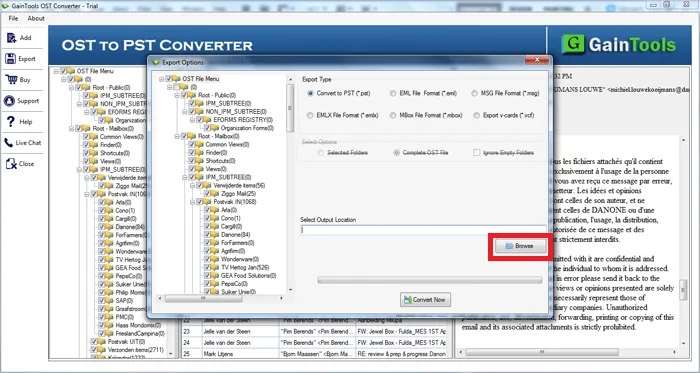
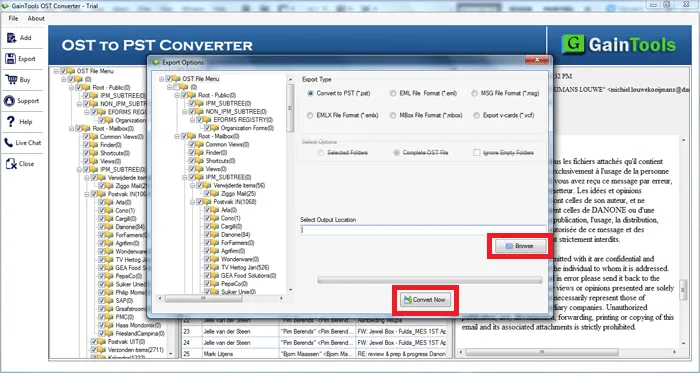
Hit the Browse button and specify a location to save the exported MBOX file.
select output location
+

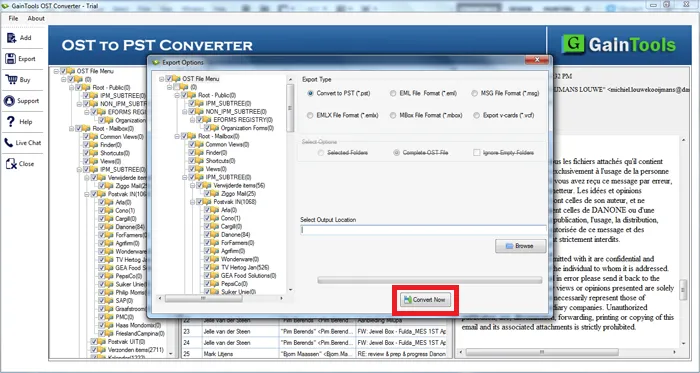
In the end, hit the Convert Now button to begin the conversion task.
select output location

OST to MBOX Converter Utility FAQs

+

Of course, you are allowed to access any OST file size for migration.

+

MBOX supports Thunderbird platform, it means you can access Outlook OST to Thunderbird.

+

It depends on the file size but the app doesn’t take more than a few minutes to migrate data.

OST to MBOX Converter Process Images

Step-by-step visual guide to convert your OST to MBOX files

How to Use OST to MBOX Converter Software

Watch our comprehensive tutorial to learn how to convert OST to MBOX files in just a few simple steps

OST Converter Tutorial Video

Watch Tutorial

Learn how to convert OST to MBOX files step by step

Video Tutorial

Step-by-Step Guide

Complete walkthrough of the OST to MBOX process

Easy to Follow

Simple instructions for all skill levels

Quick Results

See how fast the OST to MBOX process is

OST to MBOX Converter Tool Free Download

Software Name
GainTools OST to MBOX Converter Software
Version
1.0
File Size
2.17 MB
Operating System
Windows 11/10/8.1/8/7 (64-bit & 32-bit)
Download a Trial

Take the tool to evaluate by converting 10 emails from each OST folder.

Compatibility & Format

Input Formats
OST to MBOX
Output Formats
PST, MBOX, EML, EMLX, MSG
License
TRIAL + FULL
Language
English

System Requirements

Processor
1 GHz or faster
RAM
Minimum 512 MB
Hard Disk
100 MB free space
Display
1024x768 resolution

Client’s Views about OST to MBOX Converter

See what our satisfied customers have to say about their experience with our OST to MBOX conversion tool

"I want a solution to convert OST file to MBOX file format so that it can be moved to Thunderbird application. With your software, I got perfect conversion of whole OST file with all key elements."

EM

Eleni Macron

"Once I need to export my OST file to Apple Mail. For this, I tried several solutions but this application worked like a charm for me. I am thankful to the complete team of GainTools that provided me such an effective tool."

HJ

Dimitrios Jhonson

"I lost all hopes to get a smart and reliable approach to export OST data to MBOX format. Then, my colleague suggested me your software and I tested the demo version first. I got impressed with its quick working performance and with the license edition, I exported more than 10 OST files to MBOX."

KW

Kostantina Williams