
Search Products & Tools

EML Converter Software Interface
v1.0Free Trial
30-Day Money Back
24/7 Support
Virus Free

GainTools EML to MSG Converter

Find a powerful solution to export EML file to MSG for Outlook on Windows

Total Ratings: 617 - Average Rating: 4.8 out of 5
Conversion of EML emails and attachments to MSG
Batch Convert EML to Outlook MSG for time saving
Freedom to export heavy EML files
100% safety assurance
Entire EML files preview prior you start the conversion
Effortless running on Windows 64bit and 32bit versions
Converted MSG files can be imported to Outlook 2019, 2016 2013, 2010, etc.
Software entirely preserve EML formatting and its properties

GainTools EML to Outlook MSG Converter

Export bulk EML files to MSG format to access in MS Outlook

Instant conversion

EML to MSG Converter offers a fast conversion rate and just 4 simple steps by which it takes a few minutes to complete the conversion. With the amazing interface, every beginner with no technical skills can handle it.

Secure migration

The program offers 100% safe migration of EML files to MSG format. No data loss and data leakage is there with this amazing application. It always provides healthy results by conversion of valid EML emails to MSG.

Export limitless EML files

There is no restriction on the number of EML files to export into MSG format. You can simply export unlimited EML files to MSG format to read these files into Outlook latest as well as older versions without any problem.

GainTools EML to Microsoft Outlook MSG Conversion Tool


no file size limit

Bulk conversion of EML files

EML to MSG Converter offers bulk conversion of EML files by which a user can export multiple EML files into MSG format within less time and few efforts. The utility supports Non-English text to export into MSG format. The software is capable to complete the migration in a short span of time with each and every information of EML files.

no file size limit

Maintain email formatting

The software properly maintains the formatting and email properties during and after the migration. All the details like to, cc, bcc, from, sent, hyperlinks, inline images, font styles, etc. remain intact by the application. The complete details of EML files are well retained by the application as it is as it was before the conversion.

no file size limit

Keep attachments embedded

EML to Outlook MSG Converter completely takes care of every attachment which is associated with every EML file. Without disturbing any detail of EML file along with email properties, the utility converts EML messages to MSG format in just a few clicks. Moreover, the utility offers to select a destination path to users to save MSG files.

no file size limit

Clean UI

With the simplified interface of the tool, every user can seamlessly export EML emails to MSG format. No difficulties are faced by any user in handling the utility. Screenshots and user guide on the product page will help users in performing the conversion. Moreover, users can clear all their doubts by contacting our support team which is available 24*7.

no file size limit

100% secure conversion

The program offers 100% secure conversion. No damage and data loss has occurred to any file during the conversion task. There is no issue of EML file size as big EML files are seamlessly converted to MSG format. There will be no compromise on the quality of EML files. You will find the database in its original form with any alterations.

no file size limit

Open MSG file on all Outlook versions

The software provides instant conversion of EML emails to MSG format and the converted MSG file can be easily readable on all versions of MS Outlook including the latest and older versions like Outlook 2019, 2016, 2013, 2016, 2013, 2010, 2007, 2003, and others. Plus, there is no limit on the number of EML files to export into MSG format.

no file size limit

No email client dependency

To perform the conversion of EML files to MSG format, there is no dependency on any email client like Outlook or others. Without taking help from any additional client, the conversion can be simply accomplished. To open MSG files, Outlook installation is required. Both home and business users can utilize this application.

no file size limit

Export EML from different platforms

The utility is capable to export EML files of various email clients of Windows and Mac platforms. You can simply export EML files of Thunderbird, Mac Mail, Windows Live Mail, eM Client, IncrediMail, and others. Without considering the platform of EML file, the conversion task can be simply completed by this application.

no file size limit

Preview EML files

Once EML files are uploaded on the software panel, the utility scans it and provides a complete display of EML files. One can check these files before the conversion and also filter EML files from here by picking desired EML files for migration. This is also helpful for users in imagining how EML files will appear in MSG file format.

no file size limit

Flexible file saving

The software offers users to select and save their output MSG file to their desired location that they want to save their file in, as this software does not automatically set the output file location or anything. Users can save or export the resultant file in a new or existing folder according to their preference without any file size limitations or corruption.

How to import EML file to Outlook MSG format?

GainTools EML to MSG Converter offers a few simple steps to export EML to MSG format.

+

The first step is to download and install the application on your Windows system.
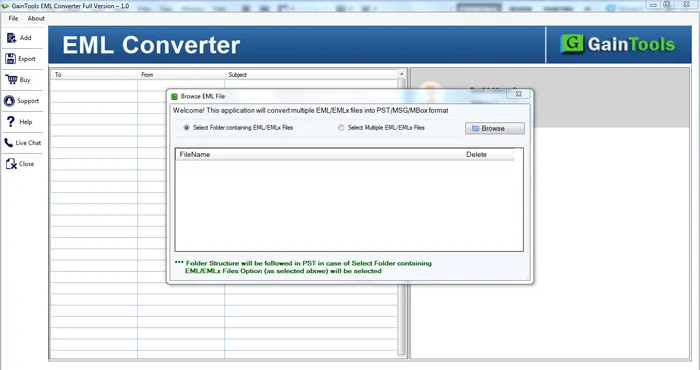
download EML Converter
+

Add EML file or folders with the help of the Browse button.
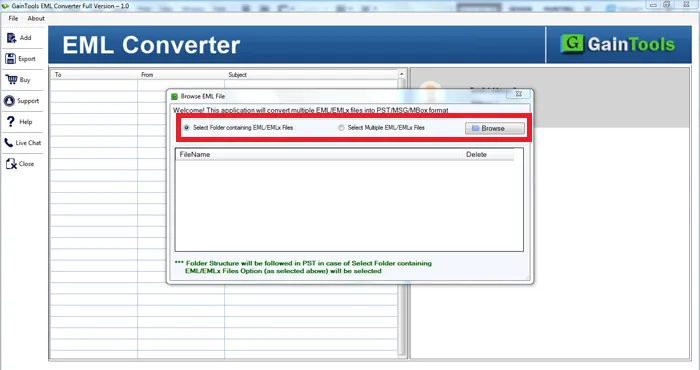
choose file folder mode
+

Get a preview of EML files prior to starting the conversion.
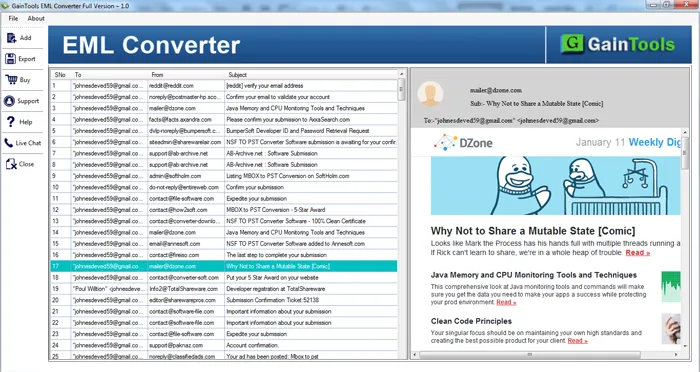
preview mbox
+

Select MSG File format under Export Type.
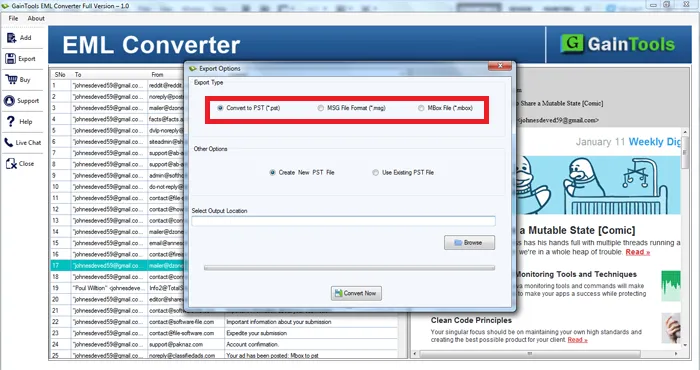
select file format
+

Go to the Browse button and mention the location of your choice where you want to save MSG files.
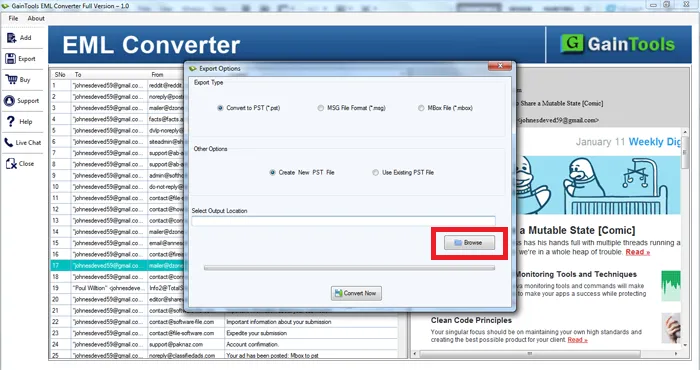
select output location
+

Click on the Convert Now option to begin the task of conversion.
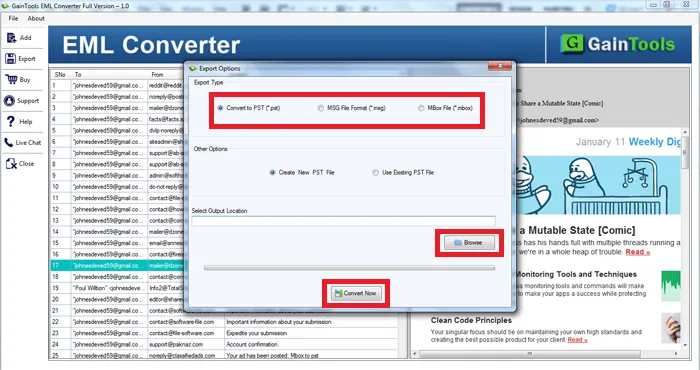
export mbox

FAQs of EML to MS Outlook MSG Converter Tool

+

No, you can export EML emails to MSG only on Windows OS.

+

Yes, EML files of all EML supporting platforms are supported to convert into MSG by this utility.

+

Of course. The converted MSG files can be simply imported to all Outlook editions including the latest and older versions.

+

Yes, with the Folder mode, users can export multiple EML files into MSG in one time without any hassles.

EML to MSG Migration Procedure Images

Step-by-step visual guide to convert your EML to MSG files

How to Use EML to MSG Converter Tool Software

Watch our comprehensive tutorial to learn how to convert EML to MSG files in just a few simple steps

EML Converter Tutorial Video

Watch Tutorial

Learn how to convert EML to MSG files step by step

Video Tutorial

Step-by-Step Guide

Complete walkthrough of the EML to MSG process

Easy to Follow

Simple instructions for all skill levels

Quick Results

See how fast the EML to MSG process is

EML to MSG Converter Tool Free Download

Software Name
GainTools EML to MSG Converter Software
Version
1.0
File Size
3.77 MB
Operating System
Windows 11/10/8.1/8/7 (64-bit & 32-bit)
Download a Trial

Take the tool to evaluate by converting 10 emails from EML to MSG File.

Compatibility & Format

Input Formats
EML to MSG
Output Formats
PST, MBOX, EMLX, MSG
License
TRIAL + FULL
Language
English

System Requirements

Processor
1 GHz or faster
RAM
Minimum 512 MB
Hard Disk
100 MB free space
Display
1024x768 resolution

Client’s views about EML to MSG Outlook MSG Converter

See what our satisfied customers have to say about their experience with our EML to MSG conversion tool

"After a lot of trouble to export data of Windows Live Mail to Outlook, I have lost hope that I would be able to get a smart and safe solution to export 1000+ EML files into MSG format, then I came to know about your EML to MSG Converter through my friend and I felt relaxed that I got the perfect solution."

KT

Kelvin Thomas

"I am happy that I have successfully exported Thunderbird EML files into MSG format with your software. I haven’t faced any trouble in accomplishing the conversion task."

AB

Allie Brown

"I just want to say a few lines of thankfulness to the entire team behind this software. Before this, I have thought that the conversion of EML messages to MSG is simple but actually it is too simple which I came to know with your tool. Amazing work by the team!"

FB

Finn Baylor